

Currency Conversion Quote endpoint
The Modulr Currency Conversion Quote API lets you get a live, executable quote for converting between two currencies. Each quote returns an exchange rate and a quoteId that stays valid until expiryDateTime.
To use the quoted rate, pass that quoteId as fx.quoteId when you call the Create a Payment endpoint, before it expires.
Quote requests are synchronous, immediate and do not move funds. They simply price a potential exhance so you can decide whether to proceed before the expiryDateTime
Do I need to use the Quote function?This depends on your chosed customer experience (CX) - if you are an automated platform that needs to move funds without interaction, you can use the Create a Payment endpoint to quote, book & intiate currency conversion in one opoeration.
The Quote endpoint is ideal where your end user(s) are interactive, and would like the oppotunity to inspect the quote (e.g. conversion amounts & fee) before confirming. An example of it's use is in Modulr's own Portal when performing a transfer with currency conversion
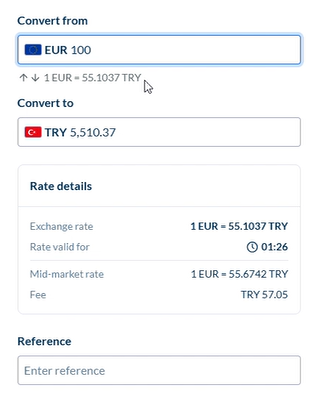
To obtain a quote, the createquote endpoint accepts the currencies to be converted, an amount and a specifier if the amount is in the selling or buying currency.
For example, to obtain a quote for £500 GBP to be converted to a varable amount of TRY depending on the prevailing rate, the parameters for the quote would be
{
  "customerId": "C21999999",
  "sellCurrency": "TRY",
  "buyCurrency": "GBP",
  "amount": 500,
  "tradeType": "SPOT",
  "tradeSide": "BUY"
}
An example of the inverse, obtaining a quote for 500 TRY to be converted to a varable amount of GBP depending on the prevailing rate, the parameters for the quote would be
{
  "customerId": "C21999999",
  "sellCurrency": "TRY",
  "buyCurrency": "GBP",
  "amount": 500,
  "tradeType": "SPOT",
  "tradeSide": "BUY"
}
{
"customerId": "C21999999",
"sellCurrency": "TRY",
"buyCurrency": "GBP",
"amount": 500,
"tradeType": "SPOT",
"tradeSide": "SELL"
}Updated about 7 hours ago