

International Payments to Modulr accounts
Routing details to Modulr account when making International (SWIFT) payments
When making an international payment ('SWIFT' payment) you must give your payer the correct details (correct Modulr BIC+IBAN) so their bank can route a payment through the SWIFT network to your Modulr account. You can find your acount BIC and IBAN in the Modulr Portal or in the identifiers returned by Get an account.
Your payer needs at minimum:
- Your IBAN and account name, as the beneficiary account.
- Your account BIC, as the beneficiary bank (also called 'account with institution' on some payment entry screens for international payments).
It's also a highly reccomended to also give the payer
- The intermediary BIC for your account BIC and currency
- The Modulr entity name and address for your account BIC.
The correct intermediary (correspondent) BIC may vary depending on the currency the payer is trying to send, using the dropdowns below select where your account is held to look up the correct information.
Account with Modulr UK
| Your BIC (Account with Institution) | Your Account Currency | Correspondent (Intermediary) BIC needed to reach Modulr | Modulr Entity Name | Modulr Entity Address |
|---|---|---|---|---|
| MODRGB23XXX | Any Supported Currency | CHASGB2LXXX | Modulr FS Ltd LEI 984500BFFA6CBFA57C93 | Modulr FS Ltd, The Featherstone Building, 66 City Road, London EC1Y 2AL, United Kingdom |
Account with Modulr EU (Netherlands)
| Your BIC (Account with Institution) | Your Account Currency | Correspondent (Intermediary) BIC needed to reach Modulr | Modulr Entity Name | Modulr Entity Address |
|---|---|---|---|---|
| MODRNL22XXX | EUR | CHASDEFXXXX | Modulr Finance B.V. LEI 2138009BPIB3N98CK876 | Strawinskylaan 4117, Amsterdam, 1077ZX |
| MODRNL22XXX | Any Supported Currency except EUR | CHASNL2XXXX | Modulr Finance B.V. LEI 2138009BPIB3N98CK876 | Strawinskylaan 4117, Amsterdam, 1077ZX |
Account with Modulr EU (Irish Branch)
| Your BIC (Account with Institution) | Your Account Currency | Correspondent (Intermediary) BIC needed to reach Modulr | Modulr Entity Name | Modulr Entity Address |
|---|---|---|---|---|
| MODRIE22XXX | EUR | CHASDEFXXXX | Modulr Finance B.V., Irish Branch LEI 98450052C5E7SZ5EA950 | 77 Sir John Rogerson’s Quay, Dublin 2, D02 NP08 |
| MODRIE22XXX | Any Supported Currency except EUR | CHASNL2XXXX | Modulr Finance B.V., Irish Branch LEI 98450052C5E7SZ5EA950 | 77 Sir John Rogerson’s Quay, Dublin 2, D02 NP08 |
Account with Modulr EU (Spanish Branch)
| Your BIC (Account with Institution) | Your Account Currency | Correspondent (Intermediary) BIC needed to reach Modulr | Modulr Entity Name | Modulr Entity Address |
|---|---|---|---|---|
| MODRESB2XXX | EUR | CHASDEFXXXX | Modulr Finance B.V., Spain Branch LEI 959800DZC2UKMCTEN383 | The Shed CoWorking, Calle de Hermosilla 48, 1st Floor, 28001 |
| MODRESB2XXX | Any Supported Currency except EUR | CHASNL2XXXX | Modulr Finance B.V., Spain Branch LEI 959800DZC2UKMCTEN383 | The Shed CoWorking, Calle de Hermosilla 48, 1st Floor, 28001 |
Account with Modulr EU (French Branch)
| Your BIC (Account with Institution) | Your Account Currency | Correspondent (Intermediary) BIC needed to reach Modulr | Modulr Entity Name | Modulr Entity Address |
|---|---|---|---|---|
| MODRFRP2XXX | EUR | CHASDEFXXXX | Modulr Finance B.V., France Branch LEI 254900XUU0FVXPTGEF04 | 54 Rue de Londres, Paris, France 75008 |
| MODRFRP2XXX | Any Supported Currency except EUR | CHASNL2XXXX | Modulr Finance B.V., France Branch LEI 254900XUU0FVXPTGEF04 | 54 Rue de Londres, Paris, France 75008 |
Payments in non-account currencies are not accepted.When sending international payments, Modulr will only accept the payment in the currency your Modulr account is held in (e.g. EUR, SEK, GBP) - you may be able to ask your bank to perform a conversion to this currency before sending or as part of the instruction. Check with the bank you where you hold funds you want to send on how to do this.
Payments in non-account currencies will be returned as unable to apply. This may take several days to return via the SWIFT network. Always check you are sending the right currency.
Accounts at Modulr BICs can receive any of the 20 supported currencies
Worked example
A customer with a USD account held with Modulr FS Ltd gives their payer:
| Detail | Value |
|---|---|
| Beneficiary name | The name on your Modulr account |
| Beneficiary IBAN | GB99MODR12345612345678 |
| Beneficiary bank BIC | MODRGB23XXX |
| Beneficiary bank | Modulr FS Ltd, The Featherstone Building, 66 City Road, London EC1Y 2AL, United Kingdom |
| Intermediary BIC | CHASGB2LXXX |
| Currency | USD |
Making the payment
International Payment entry can vary between banksThere is no single, consistent guide to entering international payments - always refer to your bank's online help, guides and support channels if you are unsure.
A payment entry screen at a (fictitious) bank could look like the exmaple below, annotated to assist entry
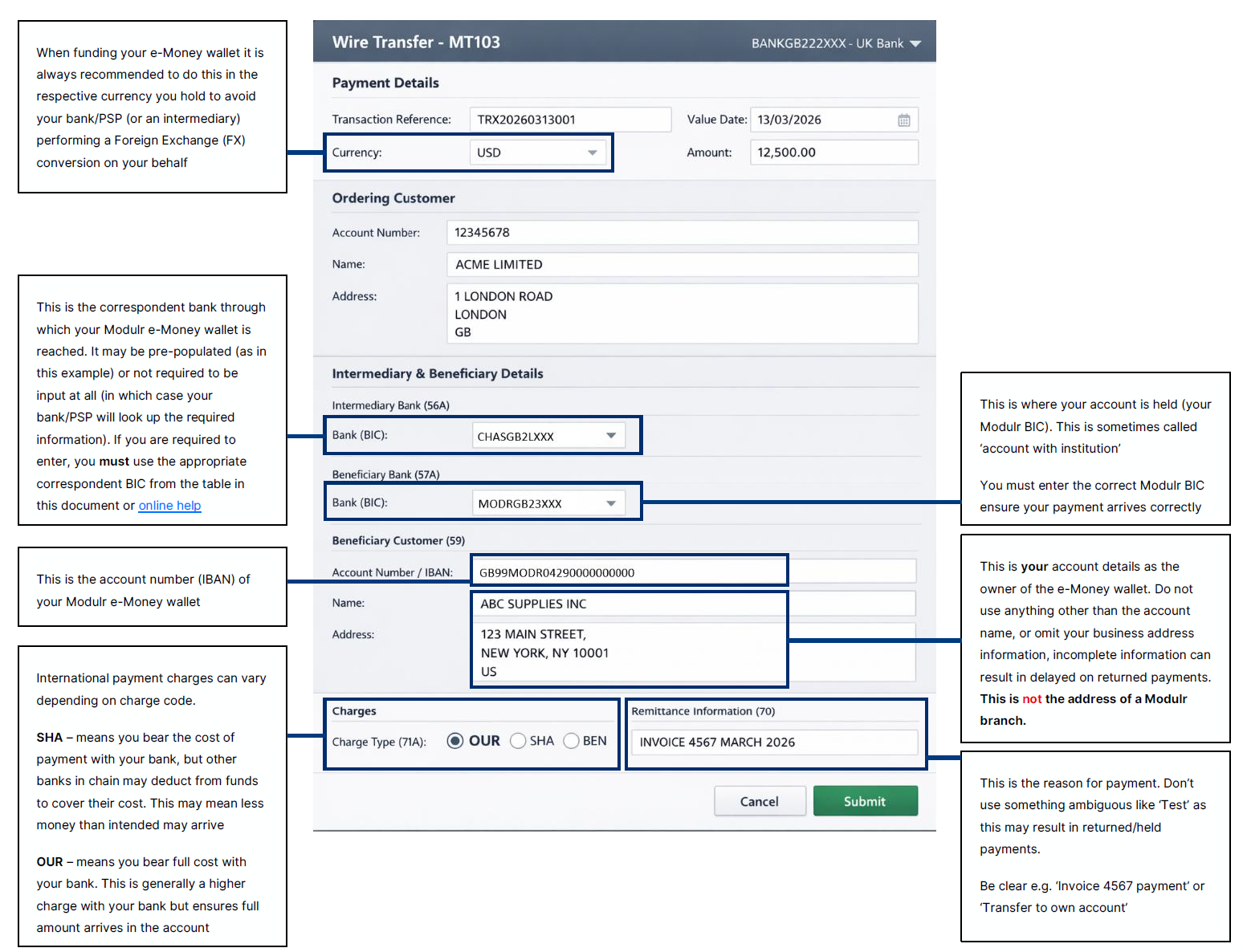
The sending payment institution should be provided the IBAN & BIC of your Modulr account along with the correct routing information (Modulr account holdin BIC and currency dependent).
Notes:
- Many sending payment institutions will auto-complete routing information to simplify sending payments; unless the the institution requires correspondent/intermediary as a mandatory field do not enter this information.
- If the sending payment institution auto-completes information, populating a correspondent/intermediary that is different to the above, it is strongly advised that you check with your bank before making the payment; give them the detials from this page as a guide on which intermediary they should be using.
- Payments sent via SWIFT will typically be received within 1 business day, however it can take up to 3 to 5 business days with longer time scales applying if there are issues/errors requiring manual intervention by correspondent banks.
- Queries on the status of a payment made via SWIFT to a Modulr account must be raised directly with the sending bank as Modulr may not have visibility of the payment.
Troubleshooting a payment:
If a payment sent via SWIFT has been returned, you should ask the sending payment institution for the 'MT103 copy' message that they sent.
- The required information above must be populated correctly within the message. The table below shows an example the minimum requirement for sending to GB account:
| Requirement | MT Message Row/Field | Example |
|---|---|---|
| Modulr’s correspondent (intermediary) BIC | :56A: | CHASGB2LXXX |
| Your Modulr account BIC | :57A: | MODRGB23XXX |
| Your Modulr account IBAN | :59: | /GB99MODR12345612345678 JOE BLOGGS |
If this information isn't present or is populated incorrectly, you should correct with the sending payment institution and resubmit the payment.
SWIFT MT Message fields are shown for convenience/example onlyThe SWIFT 'MT' message format is legacy, and largely replaced inter-bank with the newer 'MX' message format. Typically banks still refer to the older 'MT' fields in payment entry screens, message copy/reports etc. as their customer systems still deal with the older formats.
Updated 23 days ago