

Creating a cVRP Payment
cVRP paymentsA cVRP payment can only be initiated once the user has successfully authorised a consent. See cVRP consent for details.
Initiating a cVRP payment
The diagram below provides a high-level overview of the cVRP payment process.
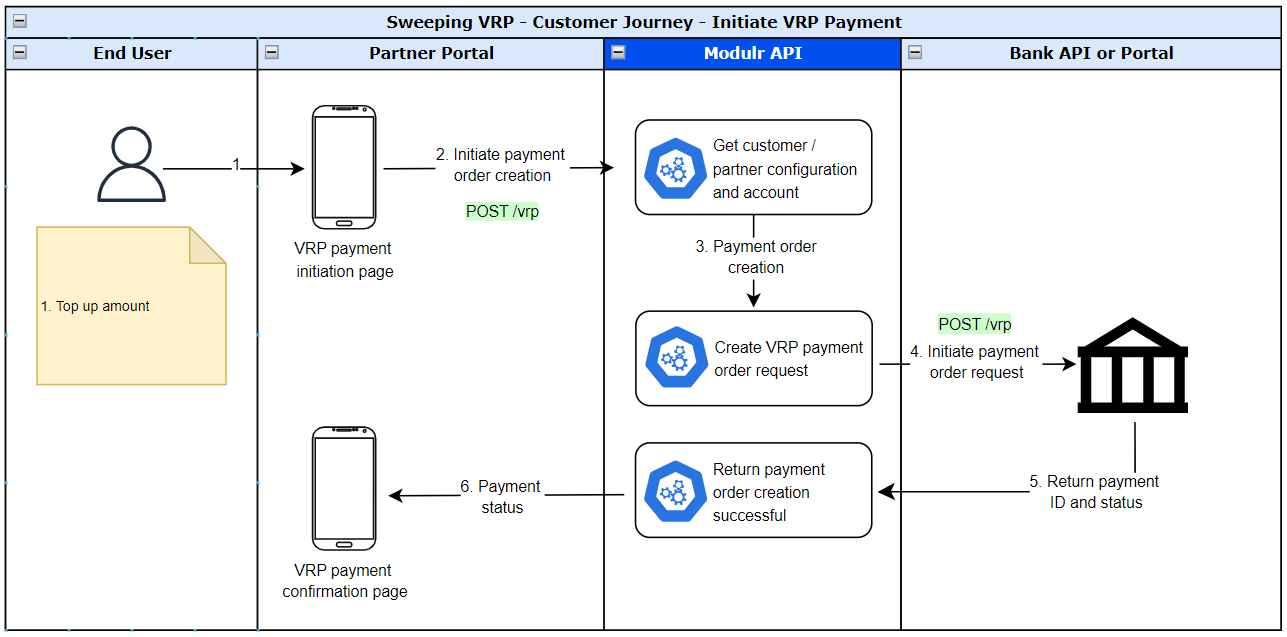
Step 1: Initiate a cVRP payment
This API request initiates a new cVRP payment against an existing authorised consent.
Payments can only be initiated against a consent in AUTHORISED status. Requests made against a consent in any other state (e.g. AWAITING_AUTHORISATION, REVOKED, REJECTED, EXPIRED) will return an unsuccessful response.
The Consent ID used must belong to the customer making the API call. An incorrect or mismatched Consent ID will result in an unsuccessful response.
For cVRP, an additional field is mandatory at payment initiation: interactionType.
{
  "consentId": "I000000001",
  "payment": {
    "currency": "GBP",
    "amount": 49.99,
    "reference": "Invoice ABC123"
  },
  "interactionType": "OffSession"
}
Payment parameter definitions
| Field | Description | Type | Validation |
|---|---|---|---|
consentId | The ID of the authorised consent being used for this payment. Must belong to the user making the API call and be in AUTHORISED status. | String | Required. |
payment | Payment amount and reference details. | Object | Required. |
payment.amount | Amount to be paid. Must not exceed the maximumIndividualAmount set on the consent, and must not cause the cumulative periodic limit to be exceeded. | String | Positive value, max two decimal places. |
payment.currency | Currency of the payment in ISO 4217 format. | String | Only GBP is supported. |
payment.reference | Payment reference. Min 6, max 18 characters. Alphanumeric plus -, ., &, /, and space. If a reference was set on the consent, this field must match it. | String | Min 6, max 18 characters. |
interactionType | Whether the payment is being made while the user is actively present (InSession) or in the background without user interaction (OffSession). Mandatory for cVRP. Must be consistent with the interactionTypes set on the consent. | Enum | InSession or OffSession. Mandatory for cVRP. |
Response - payment initiated
{
  "id": "P000000001",
  "status": "SUBMITTED"
}
Response - error
{
  "field": "string",
  "code": "GENERAL",
  "errorCode": "string",
  "message": "string",
  "sourceService": "string"
}
Confirm the availability of funds (optional)
Availability of fundsThis is an optional step. Confirming funds are available before initiating a payment reduces the likelihood of a failed payment due to insufficient funds.
Use the Consent ID to check whether sufficient funds are available in the payer's account before initiating a payment.
{
  "currency": "GBP",
  "amount": "49.99"
}
If the check is successful, the response confirms whether funds are available:
{
  "fundsAvailable": true,
  "fundsAvailabilityCheckDateTime": "2024-04-25T12:00:50.047Z"
}
External balanceThe funds confirmation response only indicates whether sufficient funds are available for the specified amount. The actual account balance is not returned.
Get the status of a cVRP payment (optional)
Use the payment ID returned at initiation to retrieve the current status and full details of a cVRP payment.
The GET /vrp/[id] endpoint returns all information associated with the payment, including the Consent ID, payment details, and current status. For cVRP payments, the response also includes statusReason and statusReasonCode where these have been returned by the bank.
{
  "consentId": "I000000001",
  "payment": {
    "currency": "GBP",
    "amount": 49.99,
    "reference": "Invoice ABC123"
  },
  "status": "ACCEPTEDSETTLEMENTCOMPLETEDCREDITORACCOUNT",
  "statusReason": "string",
  "statusReasonCode": "string"
}
statusReason and statusReasonCodeThese fields are returned for cVRP payments only, where the bank has provided them alongside the payment status. They are not present on Sweeping VRP payment responses.
Payment status model
| Status | Terminal? | Description |
|---|---|---|
ACCEPTEDSETTLEMENTCOMPLETEDCREDITORACCOUNT | Yes | Settlement on the recipient's account is complete. |
ACCEPTEDSETTLEMENTCOMPLETEDDEBITORACCOUNT | Yes | Settlement on the payer's account is complete. |
ACCEPTEDCUSTOMERPROFILE | No | Technical validation and customer profile checks were successful. |
ACCEPTEDSETTLEMENTINPROCESS | No | All preceding checks passed and the payment has been accepted for execution. |
ACCEPTTECHNICALVALIDATION | No | Authentication and syntactical and semantic validation were successful. |
ACCEPTEDWITHCHANGE | No | The instruction was accepted but a change will be made, such as date or remittance not sent. |
ACCEPTEDWITHOUTPOSTING | No | The payment has been accepted without being posted to the recipient's account. |
BLOCKED | No | The payment is blocked. Funds will not be posted to the recipient's account or returned to the payer. |
PENDING | No | The payment is pending. Further checks and status updates will follow. |
RECEIVED | No | The payment instruction has been received. |
REJECTED | Yes | The payment has been rejected. |
Modulr status codes
The following codes are returned from the Modulr service:
| Status | Terminal? | Description |
|---|---|---|
SUBMITTED | No | Payment instruction submitted; status pending. |
ER_GENERAL | No | A generic error occurred when processing the payment. |
ER_EXTSYS | No | The payment failed because of a problem communicating with the bank's systems. |
Updated 4 months ago