

Creating a cVRP Consent
Creating a cVRP Consent
Purpose of cVRP consent
The cVRP consent defines the parameters within which cVRP payments can be made.
Setting up the consent means a user does not need to authenticate individual payments with their bank, as long as each payment stays within the agreed limits.
The consent process generates a Consent ID which is then used to initiate subsequent cVRP payments.
Consent must be in place before any cVRP payment can be made.
Consent parameters
There are 5 core parameters contained in the consent, plus additional fields that are mandatory for cVRP:
- Time period -- period during which the maximum amount per period is applied. Must be one of: Day, Week, Fortnight, Month, Half-Year, Year
- Maximum amount per period -- limit on the cumulative value of payments within the time period. Mandatory.
- Maximum amount per payment -- limit on the value of any individual payment. Mandatory.
- Period start date -- date the consent starts from. Optional; if left blank, the value provided by the bank is used.
- Expiry date -- date the consent ends. Optional; if left blank, the value provided by the bank is used.
The following fields are additionally mandatory for cVRP:
- Type -- must be
CVRP1for Wave 1 use cases. - Interaction types -- whether payments will be made while the user is actively present (
IN_SESSION) or in the background without user interaction (OFF_SESSION). At least one must be provided. We recommend providing bothIN_SESSIONandOFF_SESSIONif you will be supporting both payment modes, which will allow you to pass either one in the cVRP payment itself. - Risk -- a block of fields describing the payment context. Most fields are mandatory for cVRP; see the field definitions table below for detail.
- Ultimate Creditor / Ultimate Debtor -- mandatory to capture the ultimate beneficiary or payer where they differ from the named account holder.
Creating a cVRP consent
The diagram below provides a high-level overview of the cVRP consent creation process.
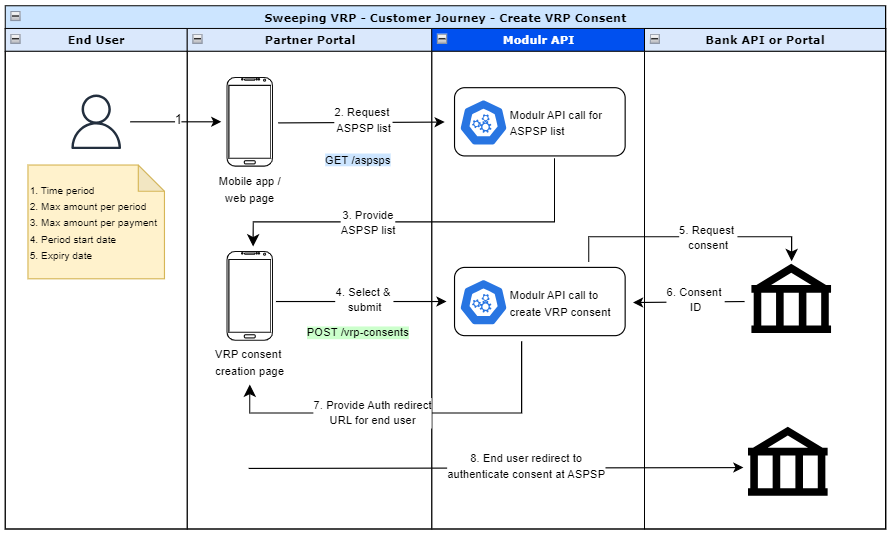
Step 1: List the banks that support cVRP
As part of the consent authentication process the user will need to select their bank so they can be directed to the relevant authentication URL.
Use the GET ASPSPs API to fetch the latest list of banks and their supported capabilities. Only institutions that have COMMERCIAL_VRP status ENABLED should be offered to the user.
This list may change over time as banks are added or their capabilities updated, so your application must handle changes dynamically.
[
  {
    "type": "SINGLE_IMMEDIATE",
    "status": "ENABLED"
  },
  {
    "type": "SWEEPING_VRP",
    "status": "ENABLED"
  },
  {
    "type": "COMMERCIAL_VRP",
    "status": "ENABLED"
  }
]
Step 2: Create a cVRP consent
Request
This request creates a cVRP consent for authorisation by the user. Once authorised, the consent can be used to initiate one or more payments within its parameters.
{
  "type": "CVRP1",
  "aspspId": "H100000001",
  "destination": {
    "type": "SCAN",
    "accountNumber": "12345678",
    "sortCode": "000000",
    "name": "Example Merchant Ltd"
  },
  "paymentConstraints": {
    "maximumIndividualAmount": {
      "currency": "GBP",
      "amount": 250
    },
    "periodicLimits": [
      {
        "currency": "GBP",
        "amount": 1000,
        "periodAlignment": "CALENDAR",
        "periodType": "MONTH"
      }
    ]
  },
  "interactionTypes": [
    "IN_SESSION",
    "OFF_SESSION"
  ],
  "risk": {
    "paymentContextCode": "BillingGoodsAndServicesInAdvance",
    "merchantCategoryCode": "4900",
    "merchantCustomerIdentification": "CUST-001",
    "contractPresentIndicator": true,
    "beneficiaryPrepopulatedIndicator": true,
    "paymentPurposeCode": "BKDF",
    "categoryPurposeCode": "BONU"
  },
  "validFromDate": "2025-01-01T00:00:00Z",
  "validToDate": "2026-01-01T00:00:00Z",
  "reference": "Invoice ABC123"
}
Response - created
{
  "vrpConsentInitiationId": "I000000001",
  "redirectUrl": "https://www.bankofmoney.com/authorize"
}
Response - bad request
{
  "field": "string",
  "code": "GENERAL",
  "errorCode": "string",
  "message": "string",
  "sourceService": "string"
}
Consent parameter definitions
M = Mandatory | O = Optional | C = Conditional
- For Payment Purpose Code and Category Purpose Code, refer to the list here for the most appropriate one for your consent: OB ISO External Codeset
- For Payment Purpose Code - use
ExternalPurpose1Codefrom link above - For Category Purpose Code - use
ExternalCategoryPurpose1Codefrom link above
- For Payment Purpose Code - use
| Field | Description | Type | M/O/C | Validation |
|---|---|---|---|---|
type | The cVRP consent type. Must be CVRP1 for Wave 1 integrations. | Enum | M | Must be CVRP1. |
aspspId | Identifier of the user's bank where the consent will be created. The bank must have COMMERCIAL_VRP capability enabled. | String | M | Bank must have COMMERCIAL_VRP enabled, otherwise the request is rejected. |
destination | Destination account that will receive payments initiated under this consent. | Object | M | - |
destination.type | Type of destination account. Use ACCOUNT for a Modulr account or SCAN for an external account with sort code and account number. | Enum | M | ACCOUNT or SCAN. |
destination.id | Modulr account identifier. Required when destination.type is ACCOUNT. | String | C | Required if destination.type is ACCOUNT. |
destination.accountNumber | Account number of the destination. Required when destination.type is SCAN. | String | C | Required if destination.type is SCAN. |
destination.sortCode | Sort code of the destination. Required when destination.type is SCAN. | String | C | Required if destination.type is SCAN. |
destination.name | Name of the destination account. Required when destination.type is SCAN. | String | C | Required if destination.type is SCAN. |
paymentConstraints | Limits that apply to payments made under this consent. | Object | M | - |
paymentConstraints.maximumIndividualAmount | Maximum value of any single payment made under this consent. | Object | M | - |
paymentConstraints.maximumIndividualAmount.amount | Maximum individual payment amount. | String | M | Positive value, max two decimal places. |
paymentConstraints.maximumIndividualAmount.currency | Currency. Must be in ISO 4217 format. | String | M | Only GBP is supported. |
paymentConstraints.periodicLimits | Maximum cumulative value of all payments in a given period. At least one periodic limit is required. | Array | M | At least one limit must be supplied. No duplicate period types. |
paymentConstraints.periodicLimits.amount | Maximum cumulative amount for the period. | String | M | - |
paymentConstraints.periodicLimits.currency | Currency. Must be in ISO 4217 format. | String | M | Only GBP is supported. |
paymentConstraints.periodicLimits.periodAlignment | Whether the period starts from the date of consent creation (CONSENT) or aligns to the calendar (CALENDAR). | Enum | M | CONSENT or CALENDAR. Only one type per consent. |
paymentConstraints.periodicLimits.periodType | The period length. | Enum | M | DAY, WEEK, FORTNIGHT, MONTH, HALF_YEAR, or YEAR. No duplicates. |
interactionTypes | Whether payments will be made while the user is present or in the background. Mandatory for cVRP. | Array | M | One or both of InSession, OffSession. |
risk.paymentContextCode | Describes the payment context. | String | M | See Open Banking specification for valid values. |
risk.merchantCategoryCode | Four-digit MCC code identifying the merchant's business type. | String | M | - |
risk.merchantCustomerIdentification | The merchant's identifier for the customer. | String | M | - |
risk.contractPresentIndicator | Indicates whether a contract is in place between the merchant and the customer. | Boolean | M | - |
risk.beneficiaryPrepopulatedIndicator | Indicates whether the beneficiary details were pre-populated. | Boolean | M | - |
risk.paymentPurposeCode | ISO 20022 purpose code describing the reason for the payment. | String | M | - |
risk.categoryPurposeCode | ISO 20022 category purpose code. | String | M | - |
risk.deliveryAddress | Delivery address associated with the payment. | Object | O | Optional for cVRP. |
risk.beneficiaryAccountType | Type of beneficiary account (e.g. Business, Personal). | String | O | Optional for cVRP. |
ultimateCreditor | The ultimate recipient of the payment, where different from the destination account holder. | Object | O | Full structure including name, identification, and postal address. cVRP only. |
ultimateDebtor | The ultimate payer, where different from the account holder authorising the consent. | Object | O | Full structure including name, identification, and postal address. cVRP only. |
validFromDate | Date and time from which payments can be initiated. Format: YYYY-MM-DDTHH:mm:ssZ. If not provided, the bank's value is used. | ISODateTime | O | Must be before or equal to validToDate. |
validToDate | Date and time after which no further payments can be initiated. Format: YYYY-MM-DDTHH:mm:ssZ. If not provided, the bank's value is used. | ISODateTime | O | Must be after or equal to validFromDate. |
reference | A reference for the consent. Min 6, max 18 characters. Alphanumeric plus -, ., &, /, and space. | String | M | Min 6, max 18 characters. |
Regarding paymentConstraints.periodicLimits.periodAlignment, the definitions for CONSENT and CALENDAR are as follows:
| Period Alignment | Definition |
|---|---|
CONSENT | The maximum amount resets from the moment the user authorises the consent. |
CALENDAR | The maximum amount is based on calendar dates. If the user authorises the consent partway through a period, the limit is pro-rated for the remainder of that period. For example, a £1,000 monthly limit authorised halfway through the month allows £500 for the rest of that month, then resets to £1,000 at the start of the next. |
Retrieve a cVRP consent (optional)
Use the Consent ID to retrieve the full details of a cVRP consent. The response includes all fields submitted at creation, plus the current consent status. Only the customer or partner that created the consent can retrieve it.
{
  "type": "CVRP1",
  "aspspId": "H100000001",
  "destination": {
    "type": "SCAN",
    "accountNumber": "12345678",
    "sortCode": "000000",
    "name": "Example Merchant Ltd"
  },
  "paymentConstraints": {
    "maximumIndividualAmount": {
      "currency": "GBP",
      "amount": 250
    },
    "periodicLimits": [
      {
        "currency": "GBP",
        "amount": 1000,
        "periodAlignment": "CALENDAR",
        "periodType": "MONTH"
      }
    ]
  },
  "interactionTypes": ["OffSession"],
  "risk": {
    "paymentContextCode": "BillingGoodsAndServicesInAdvance",
    "merchantCategoryCode": "4900",
    "merchantCustomerIdentification": "CUST-001",
    "contractPresentIndicator": true,
    "beneficiaryPrepopulatedIndicator": true,
    "paymentPurposeCode": "BKDF",
    "categoryPurposeCode": "BONU"
  },
  "validFromDate": "2025-01-01T00:00:00Z",
  "validToDate": "2026-01-01T00:00:00Z",
  "reference": "Invoice ABC123",
  "status": "AUTHORISED"
}
Consent status model
| Consent State | Description |
|---|---|
AWAITING_AUTHORISATION | The consent is awaiting authorisation by the user. |
AUTHORISED | The consent has been successfully authorised. |
REJECTED | The consent was rejected by the user. |
REVOKED | The consent has been revoked. |
EXPIRED | The consent has expired. Only applicable if an expiry date was set. |
ER_GENERAL | A generic error occurred when processing the consent. |
ER_EXTSYS | The consent failed because of a problem communicating with the bank's systems. |
Revoke a cVRP consent
Use the Consent ID to revoke a cVRP consent. This immediately prevents any further payments being initiated under that consent. The consent details remain retrievable after revocation.
DELETE https://api.modulrfinance.com/vrp-consents/I000000001202 Accepted
WarningRevoked consents cannot be reinstated. If the user wishes to continue making payments, a new consent must be created and authorised.
Updated 4 months ago