

Build With AI (MCP)
Early access: The Modulr MCP is available for early access. We're actively improving the experience based on developer feedback — if something doesn't work as expected, let us know (see Feedback below).
Modulr supports the Model Context Protocol (MCP) — an open standard that connects AI coding assistants directly to Modulr's published API reference, including endpoints, request shapes, and field requirements. When you enable the Modulr MCP in your AI tool, it can search and reason over this documentation to help you build your integration faster.
The MCP does not store or manage your credentials — any sandbox API calls use credentials configured in your own AI tool. See Before you start to get set up.
Before you start
No credentials are needed to connect to the MCP and discover Modulr's API reference. If you want your AI tool to make sandbox API calls, you will need:
- Modulr developer credentials — see Getting Started to begin your orientation and Getting Sandbox Access to get your sandbox base URL, API token, and account ID. You'll need these once you start making real API calls.
- Authentication configured — see Authentication. Use HMAC authentication from the start — it is mandatory in production
Start by testing in sandbox. Production integrations should only go live after implementation review and validation with your Modulr implementation team.
The MCP works best alongside the existing documentation. If you're new to Modulr, start with the Fundamentals section first — the MCP accelerates development, but it doesn't replace understanding how the platform works.
Important: Never include API keys, HMAC secrets, or customer data in your prompts. Manage credentials through your tool's configuration, not in conversation with the AI assistant.
Connect your AI tool
The Modulr MCP server is available at:
https://modulr.readme.io/mcpThe MCP exposes tools for searching Modulr's API reference, retrieving endpoint details, and making sandbox API calls to exposed endpoints. There are no rate limits during early access; this is subject to change.
Claude Code
claude mcp add --transport http modulr https://modulr.readme.io/mcpClaude.ai / Claude Desktop
Add the Modulr MCP as a custom connector. From Settings > Connectors > Add custom connector, use https://modulr.readme.io/mcp as the remote MCP server URL.
Cursor
{
  "mcpServers": {
    "modulr": {
      "url": "https://modulr.readme.io/mcp"
    }
  }
}
OpenAI Codex
[mcp_servers.modulr]
url = "https://modulr.readme.io/mcp"
Gemini CLI
{
  "mcpServers": {
    "modulr": {
      "httpUrl": "https://modulr.readme.io/mcp"
    }
  }
}
VS Code (Copilot)
Add to .vscode/mcp.json in your workspace, or your user-level MCP configuration:
{
  "servers": {
    "modulr": {
      "type": "http",
      "url": "https://modulr.readme.io/mcp"
    }
  }
}
Other tools
Other MCP-compatible tools may also connect using https://modulr.readme.io/mcp, provided they support remote Streamable HTTP MCP servers.
Verify your connection
After connecting, ask your assistant:
Using the Modulr MCP, what API resources are available for creating accounts?If the answer does not reference Modulr documentation or MCP tools, check that the server is enabled and trusted in your AI tool's settings.
Getting better results
Include "Modulr" in your prompts. This ensures your AI assistant uses the Modulr MCP tools rather than its general training knowledge. For example:
Using Modulr, I need to collect monthly repayments from borrowers via Direct
Debit. What API calls do I need?
Supplement with guide pages. The MCP is strongest for API reference discovery — endpoints, request shapes, and field requirements. For end-to-end integration flows, you may get better results by pasting the relevant guide page URL into your prompt for additional context, or refer to the Modulr documentation alongside your AI tool:
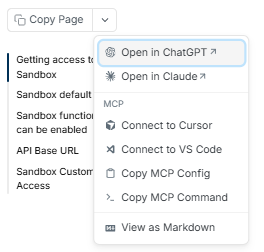
Read https://modulr.readme.io/docs/set-up-recurring-collections and use it
alongside the Modulr MCP to help me implement recurring collections.
Iterate. One prompt rarely covers an entire integration — follow up with specific questions as you build.
AI content
The Modulr MCP is an AI-assisted development tool. Outputs should be treated as a starting point for sandbox development — not as production-ready code. AI-generated code and recommendations must always be reviewed, validated, and tested before use in production.
What the MCP is best used for
The MCP is designed to accelerate sandbox development. It is not a substitute for a proper implementation process.
| What to expect | What to plan for |
|---|---|
| Fast scaffolding and prototyping | Human review before production |
| Documentation-grounded endpoint discovery | Alignment with Modulr's documentation and implementation teams |
| Reduced time to first sandbox API call | Iterative prompting — one prompt rarely produces a complete flow |
| Useful starting code and examples to review | Production hardening: auth, webhooks, error handling, Bacs timing |
Complex integrations — particularly those involving Bacs scheme rules, production authentication (HMAC HTTP Signatures), webhook security, and operational safeguards — benefit significantly from working with Modulr's implementation team. The MCP gets you started; the implementation process gets you live.
Feedback
We're iterating on the MCP based on how developers use it. If you run into issues, have suggestions, or want to share what worked well:
- Email: [email protected]
- Your Modulr contact: Raise it with your implementation or solutions engineer directly
Your feedback directly shapes what we build next.
Updated 4 months ago