

Set Up Recurring Collections
What you're building: A recurring payment collection flow — collecting fixed or variable amounts from your customers on a regular schedule. This guide focuses on Direct Debit as the primary collection method, and also covers when VRP or PIS standing orders may be the better choice.
Set Up Recurring Collections
What you're building: A recurring payment collection flow — collecting fixed or variable amounts from your customers on a regular schedule. This guide focuses on Direct Debit as the primary collection method, and also covers when VRP or PIS standing orders may be the better choice.
Who is this guide for?
You are a developer building a payment collection flow into your product. Your business needs to collect regular payments from customers — and the specifics of your use case determine which payment method and configuration is right for you.
Common use cases this guide covers
| Use case | What you're collecting | Fixed or variable? | Typical frequency |
|---|---|---|---|
| Loan repayments | Monthly instalments on a term loan (e.g. 12 × £250) | Fixed per schedule, or variable if interest recalculates | Weekly, 4 weekly, Monthly |
| Subscription / SaaS billing | Per-seat or per-tier fees (e.g. £49/month for 10 seats) | Fixed until plan changes | Monthly, annually |
| Usage-based billing | Metered charges calculated after the billing period (e.g. cloud usage, call minutes, energy) | Variable — amount changes each period | Monthly |
| Insurance premiums | Regular premium payments on a policy | Fixed for the policy term | Monthly, annually |
| Rent / property management | Tenant rent collection | Fixed for the tenancy term | Monthly |
| Membership fees | Gym, club, association, or professional body fees | Fixed | Monthly, annually |
| Utility bills | Gas, electricity, water, broadband | Variable — based on usage | Monthly, quarterly |
| BNPL instalments | Fixed number of payments following a purchase | Fixed per instalment | Weekly, fortnightly, monthly |
What you'll need to know before starting:
- How to authenticate with the Modulr API — see the Authentication guide
- How to access the sandbox environment — see Getting Sandbox Access
What this guide adds beyond the API Reference:
The API Reference documents every endpoint and parameter. This guide shows you how to assemble them into a working flow: what to call first, what to wait for, what timing constraints to respect, what to tell your customer, and when your money actually arrives.
Common search terms for this pattern: set up direct debit, create Direct Debit mandate, collect recurring payments, schedule direct debit collections, Bacs collection, automated payment collection, subscription billing UK, loan repayment collection, direct debit instruction setup, recurring billing API, VRP collection, variable recurring payments, PIS standing order, rent collection, insurance premium collection, utility billing, SaaS billing, membership fee collection.
Practical considerations — fixed vs. variable amounts
Before choosing your payment method, understand the two main collection patterns and the two ways to manage the schedule.
Fixed amount collections — the amount is the same every period. Examples: subscription fees, fixed loan repayments, rent, membership fees, insurance premiums.
Variable amount collections — the amount changes each period, calculated by your system. Examples: usage-based billing (utilities, metered SaaS), loan repayments where interest recalculates, BNPL where remaining balance shifts. You must send a new advance notice to the customer whenever the amount changes.
Who controls the schedule — Modulr or you?
For both fixed and variable amounts, you have two options for how collections are submitted to Bacs:
Option A: Modulr manages the schedule. You create a collection schedule with a frequency (weekly, monthly, etc.) and Modulr auto-submits each collection to Bacs on the right day. You set it up once and Modulr handles the timing. This works well for fixed amounts where the same value is collected every period on the same cycle.
Option B: You manage the schedule. You create individual one-off collections each billing period, controlling the exact amount and date each time. Modulr submits each one to Bacs when you tell it to — but you decide when and how much. This gives you full control.
You can use one-off collections for fixed amounts too. Even if the amount is the same every period, you may prefer to submit each collection individually rather than letting Modulr auto-collect. This is common when your system needs to confirm the payment is still due before submitting — for example, checking a loan hasn't been early-settled, or confirming a subscription is still active. It adds a step, but gives you a checkpoint before each collection.
Choosing your recurring payment method
Modulr supports multiple methods for recurring collections, each with different characteristics. Most businesses start with Direct Debit — it's the most widely adopted recurring payment method in the UK.
| Method | How it works | Settlement | Amount | Best for | Guide |
|---|---|---|---|---|---|
| Direct Debit | You pull money from the customer's account on a schedule, under a mandate they've authorised | 3-day Bacs cycle, 5 days for net settlement and access to funds | Fixed or variable | Most recurring collection use cases. Works with every UK bank account. | Covered below |
| VRP (Sweeping) | Customer gives a single consent; you initiate payments of varying amounts within agreed limits. Instant settlement. | Real-time (Faster Payments) | Fixed or variable (within consent limits) | Eligible use cases including unsecured lending. Instant settlement and fund availability checks. | VRP overview below · Getting Started with VRP |
| PIS Standing Order | Customer authorises a fixed recurring payment from their banking app via Open Banking | Real-time (Faster Payments) | Fixed only | Fixed-amount collections where you want instant settlement | PIS standing orders below · PIS Overview |
How to decide
Choose Direct Debit if:
- You need to collect from a wide range of customers (DD works with every UK bank account)
- You want full control over collection timing and amounts
- Your amounts may vary period to period
- You're collecting in arrears (e.g. usage billing, loan repayments after interest calculation)
Consider VRP if:
- Your use case is eligible for sweeping VRP (currently covers unsecured lending; commercial VRP expanding to more use cases soon)
- You value instant settlement — funds arrive in seconds, not 5 days
- You want to check fund availability before initiating the payment
- Open Banking authentication at first set up helps validate the customer
Consider PIS Standing Order if:
- Your collection amount is the same every period (fixed amount only)
- You want instant settlement
- Your customers are comfortable setting up the standing order via their banking app
- Open Banking authentication at first set up helps validate the customer
These methods are not mutually exclusive. Some businesses use Direct Debit as their primary rail and VRP or PIS as a recovery or alternative option. The Failed Payment Recovery guide covers how to use Pay by Bank as a fallback when Direct Debit fails.
By your industry
| If you are a... | Recommended approach |
|---|---|
| Lender (term loans, BNPL, invoice finance) | DD for repayment schedules (fixed or variable). Consider VRP where eligible (unsecured lending). Add the Recovery guide to reduce failed repayments. |
| Subscription / SaaS business | DD for recurring fixed-amount billing. Use one-off collections if pricing tiers change. Add the Recovery guide to reduce involuntary churn from failed payments. |
| Utility / insurance / property | DD for variable-amount collection (utilities) or fixed-amount (insurance, rent). Add the Recovery guide for handling failures. |
Direct Debit — step by step
The remainder of this guide walks through setting up recurring collections via Direct Debit. This covers both fixed amount collections (subscriptions, memberships, fixed repayment plans) and variable amount collections (usage billing, loan repayments where the amount changes).
The flow at a glance
- Set up a Mandate — the first step in creating a Direct Debit. You can only schedule collections after there is an active mandate.
- Verify the payer (PNV) — Confirm the customer's name matches the account before submitting
- Create mandate — Create the mandate via the API and submit to Bacs
- Monitor mandate status — Subscribe to the DDMandate webhook. Handle lodgement success (
ACTIVE) or failure (FAILED)
- Send advance notice — Tell your customer what you'll collect and when (legal requirement)
- Schedule collections — Set amount, frequency, and duration
- Monitor the Bacs cycle — Track each collection from submission to settlement
- Receive and confirm funds — Funds leave the payer's account Day 3, net settlement and access to funds Day 5
- Reconcile and move funds — Match to your ledger, sweep to treasury
Then what? Collections repeat automatically on your schedule. If a collection fails, see the Failed Payment Recovery guide.
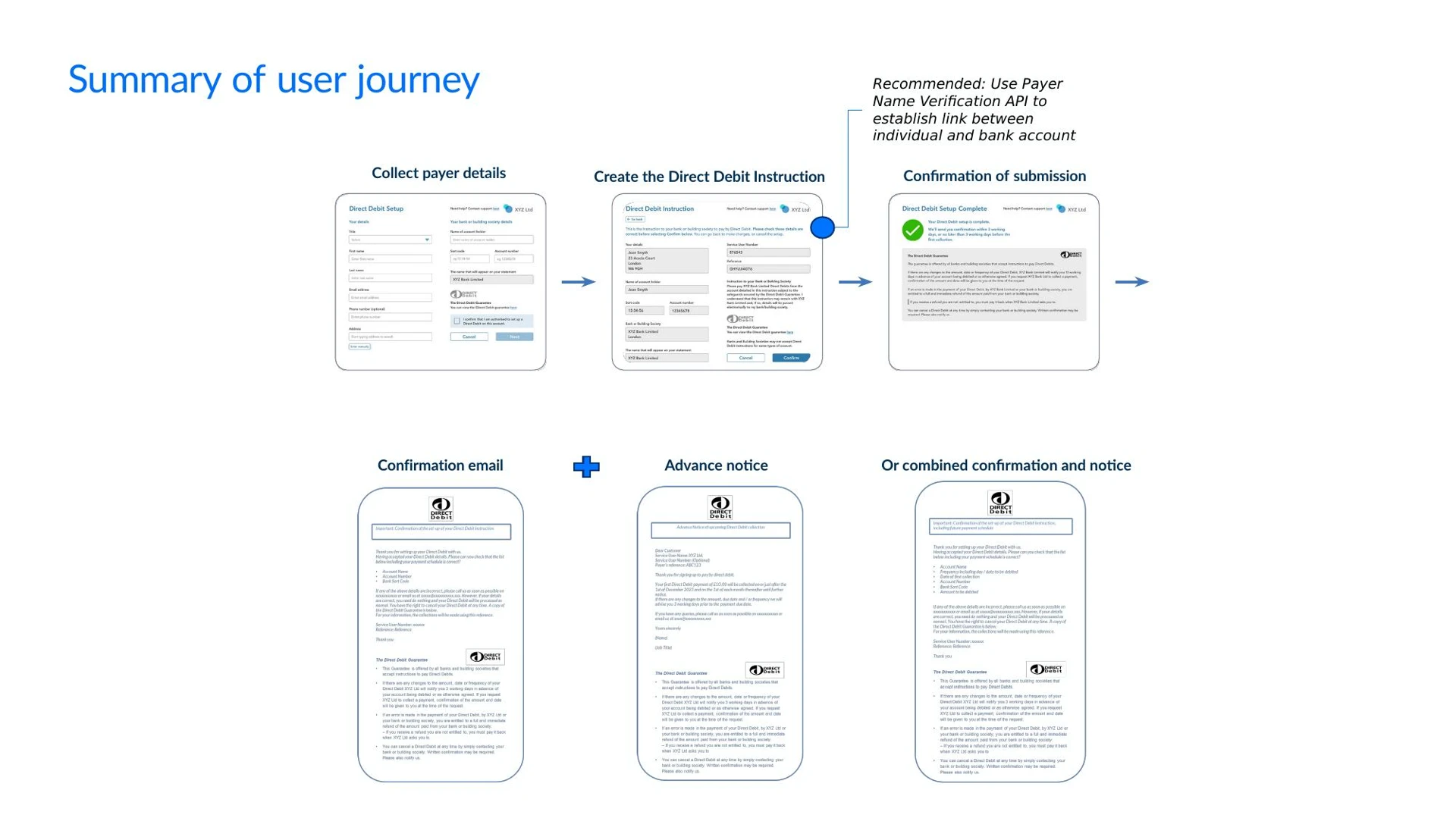
Step 1: Setting up a Mandate
What you're doing: Getting your customer's authorisation to pull money from their bank account on an ongoing basis. This is called a Direct Debit Instruction (DDI) or mandate.
Why this matters: Without a mandate, you cannot collect. The mandate is the agreement between your customer and their bank, but effectively manages your payment relationship with the customer. It stays active until the customer cancels it or you cancel it — meaning you can collect against it for months or years.
Step 1a: Verify the payer's bank details (PNV)
Before creating the mandate, verify the customer's name matches the bank account. This catches errors and fraud before the DDI is submitted — avoiding a failed lodgement 3 working days later.
API call: POST /account-name-check/payer — see Create an account name check for Direct Debit Payer. Send the customer's name, sort code, account number, and account type (PERSONAL or BUSINESS).
If the name matches, proceed to create the mandate. If it's a partial or no match, ask the customer to check and re-enter their details before continuing.
PNV is strongly recommended but not mandatory — without it, you won't know about a mismatch until Day 3.
Step 1b: Create the mandate
Once PNV passes (or if you've chosen to skip it), create the mandate via the API. This submits the DDI to Bacs — lodgement takes 3 working days.
Your customer-facing UI — DDI setup requirements
The Bacs scheme sets strict requirements for online Direct Debit setup screens. Your UI must:
Collect from the customer:
- Account holder name
- Sort code and account number
- Account type (personal or business) — required if using Payer Name Verification
Display to the customer:
- The name that will appear on their bank statement (your SUN name)
- The Direct Debit logo — displayed alongside the Direct Debit Guarantee. The logo must be used in its original form and must not be altered, recoloured, or recreated. Download the official logo assets from the Bacs website. The logo must appear on the DDI setup screen, the confirmation screen, and any page where the Direct Debit Guarantee is shown.
- The Direct Debit Guarantee — either as full text or via a link to the full text. The Guarantee wording is prescribed by the Bacs scheme and must not be modified.
- A confirmation mechanism (e.g. checkbox) where the customer confirms they are authorised to set up Direct Debit on the account
- A customer service contact number, and a postal or email address
The Direct Debit Guarantee wording
- This Guarantee is offered by all banks and building societies that accept instructions to pay Direct Debits.
- If there are any changes to the amount, date or frequency of your Direct Debit [XYZ Ltd] will notify you 3 working days in advance of your account being debited or as otherwise agreed. If you request [XYZ Ltd] to collect a payment, confirmation of the amount and date will be given to you at the time of the request.
- If an error is made in the payment of your Direct Debit, by [XYZ Ltd] or your bank or building society, you are entitled to a full and immediate refund of the amount paid from your bank or building society. – If you receive a refund you are not entitled to, you must pay it back when [XYZ Ltd] asks you to.
- You can cancel a Direct Debit at any time by simply contacting your bank or building society. Written confirmation may be required. Please also notify us.
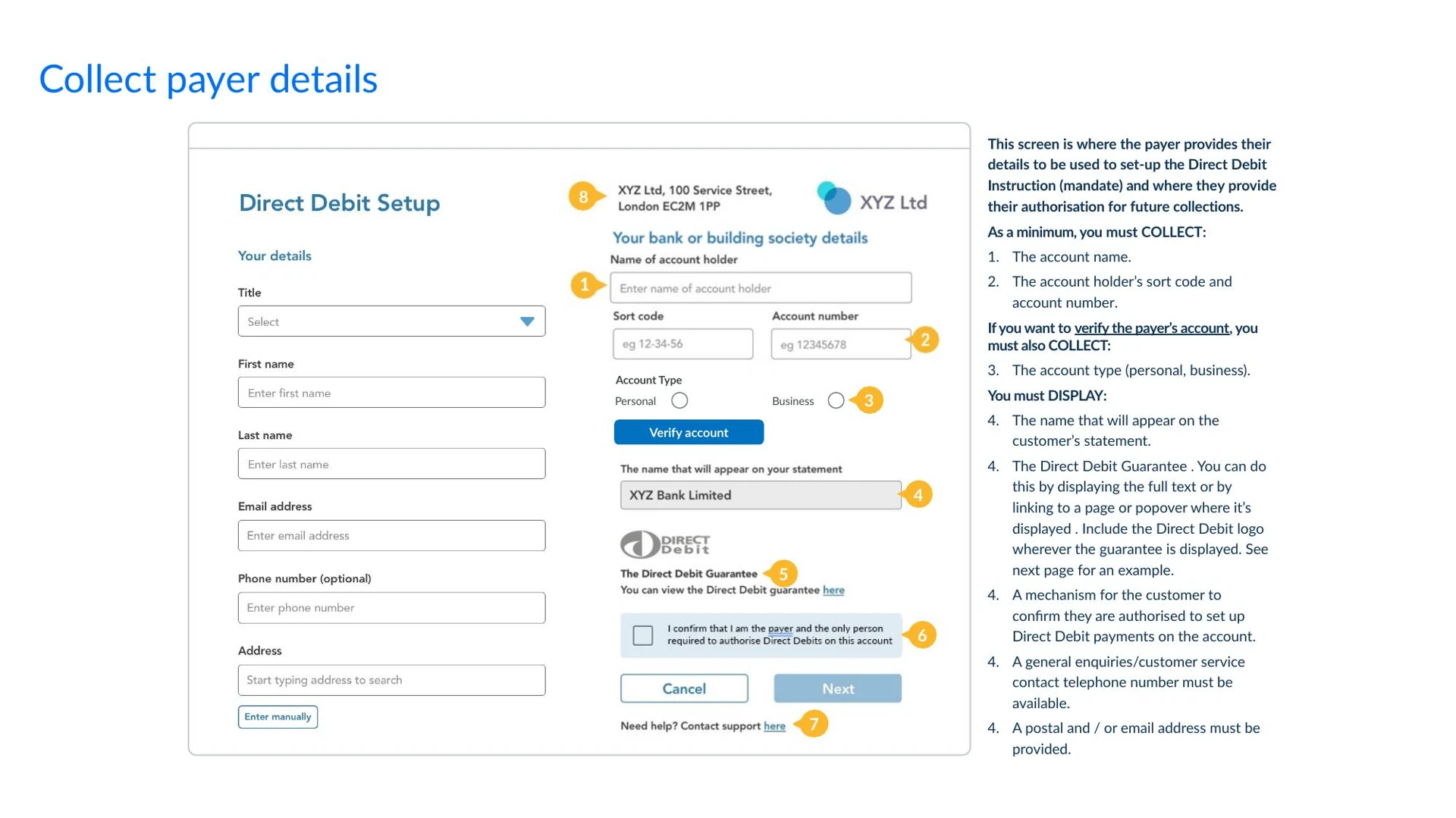
The example form above shows an annotated DDI setup screen with these requirements numbered.Your DDI setup pages, confirmation screens, and advance notice templates must be reviewed and approved by Modulr before go-live — they'll check correct use of the Direct Debit logo, the prescribed Guarantee wording, the instruction text, and your cancellation rights notice. Share your designs with your Modulr implementation contact during build — don't wait until UAT.
Practical guidance:
- Mandate reference: Use a reference that maps to something meaningful in your system — a loan ID, subscription ID, or customer reference. 6–18 alphanumeric A to Z*, 0 to 9 (numeric), hyphen (-), full stop (.) and solidus (/). Must be unique within your customer account (Service User)
- Note: Bacs only supports upper case; you can use lower case but this will be transformed to upper case in submissions and reports from Bacs.
- Timing: Submit before 15:30 on a Bacs processing day (Monday–Friday, excluding bank holidays). If you submit after 15:30, it goes out the next working day.
- Lodgement: It takes 3 working days for the mandate to be lodged at the payer's bank. The earliest collection date is 2 working days after lodgement — so the earliest possible first collection is 5 working days from mandate submission. There is no narrow window on Day 3 itself — you can schedule the collection any time after the mandate is active, as long as you allow 2 working days' lead time before the collection date.
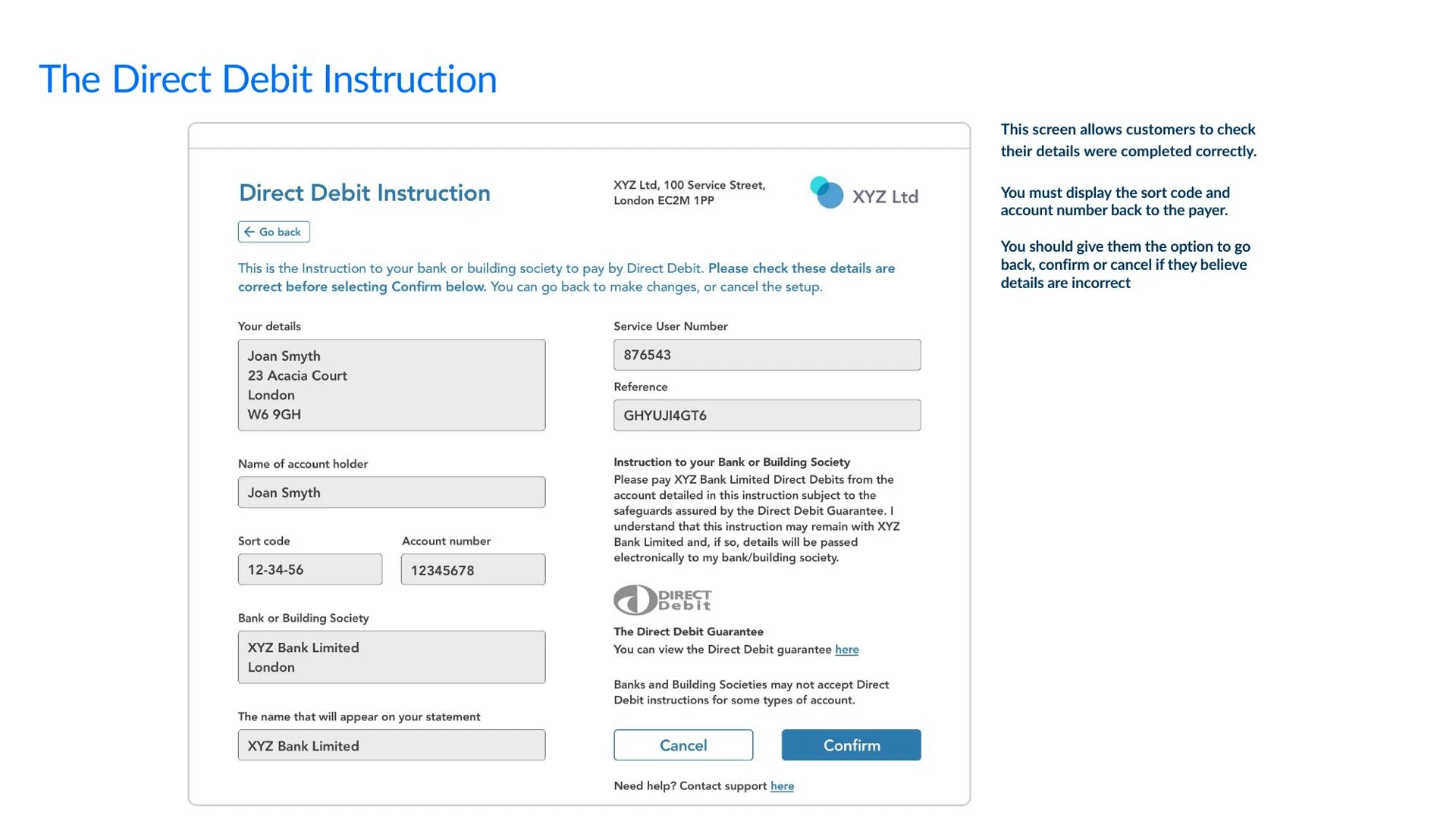
The DDI confirmation screen allows the customer to review their details before confirming. It must display the sort code and account number back to the payer, the instruction text, and the Direct Debit Guarantee. Give the customer the option to go back, confirm, or cancel.
API call: see the Create Mandate endpoint for full endpoint documentation.
Sample request — lending context (loan repayment mandate):
{
  "name": "Jane Smith",
  "address": {
    "addressLine1": "124 High Street",
    "postTown": "Ballamory",
    "postCode": "AY23 2GG",
    "country": "GB"
  },
  "reference": "LOAN0142",
  "externalReference": "External Reference",
  "accountName": "Account Name",
  "sortCode": "040004",
  "accountNumber": "37618166",
  "phone": "07400000000",
}
Sample response:
{
  "id": "G21ABC123",
  "accountId": "A0000001",
  "reference": "LOAN0142",
  "externalReference": "string",
  "createdDate": "2017-01-28T01:01:01+0000",
  "status": "PENDING",
  "nextValidCollectionDate": "2026-01-10",
  "name": "Jane Smith",
  "address": {
    "addressLine1": "124 High Street",
    "postTown": "Ballamory",
    "postCode": "AY23 2GG",
    "country": "GB"
  },
  "sortCode": "040004",
  "accountNumber": "37618166",
  "payeeAccountBid": "A0000001",
  "bulkCreateRequestId": "R210000005",
  "bulkCancelRequestId": "R210000006"
}
Confirmation screen
Once the DDI is submitted successfully, confirm the setup to the customer on screen. This should display a success message, advise when they can expect a confirmation email (within 3 working days), and show the Direct Debit Guarantee in full.
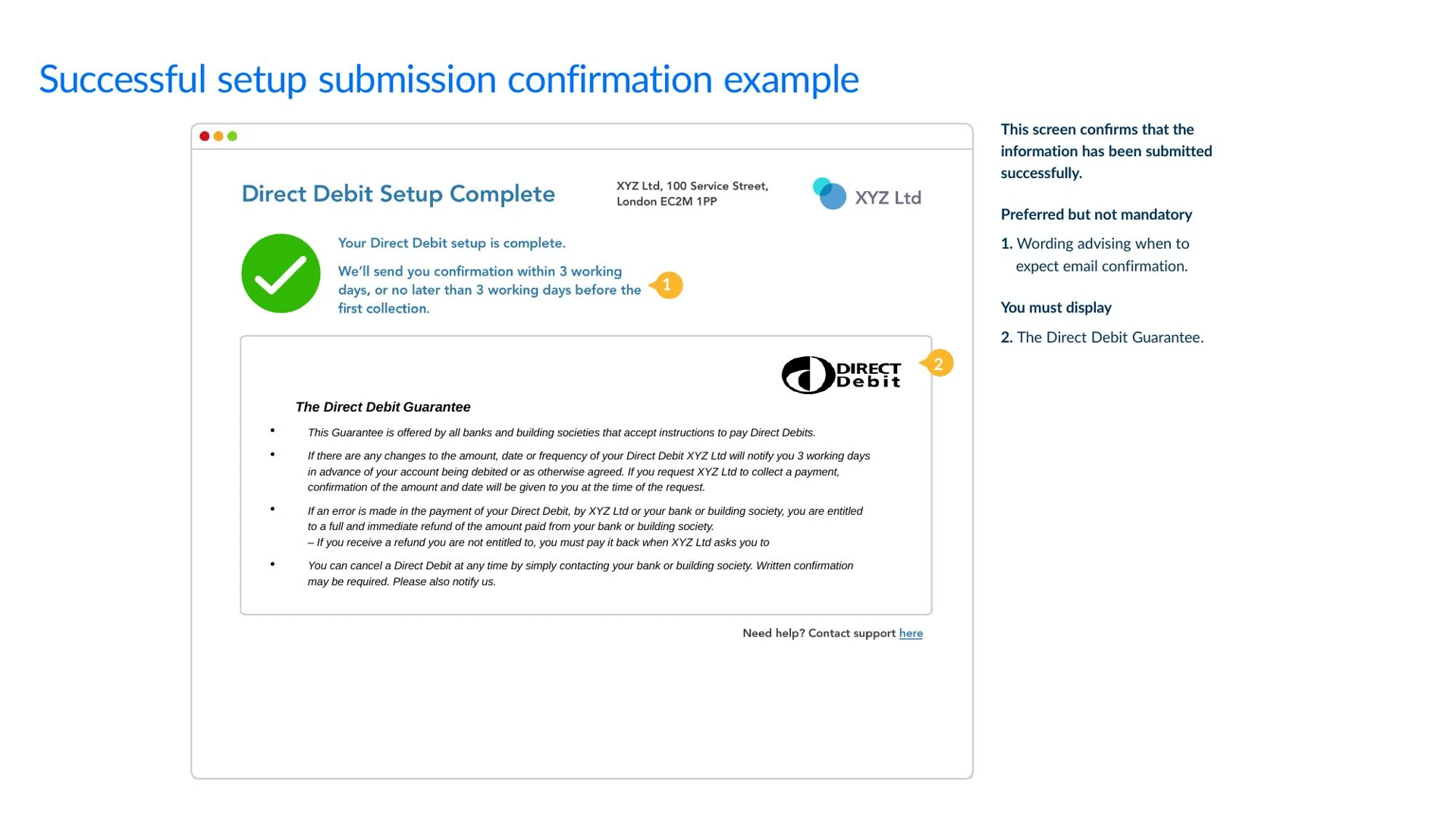
The example above shows a confirmation screen with these elements — the success message, email timing, and the Guarantee displayed below.
What to do next: Monitor the mandate status — see Step 1c below. Your system should listen for the DDMandate webhook — the status changes from PENDING to ACTIVE on Day 3 (around 14:30). Only then can you schedule collections.
Mandate lifecycle: PENDING → ACTIVE (Day 3, if successful) → remains ACTIVE until cancelled If the payer's bank rejects the mandate: PENDING → REJECTED
Step 1c: Monitor mandate status
Your system must listen for the DDMandate webhook to confirm whether the mandate was successfully lodged at the payer's bank.
What to expect:
- Day 3 (~14:30): The webhook fires with the updated mandate status.
ACTIVE— the mandate is lodged and ready. Proceed to Step 2 (send advance notice) and Step 3 (schedule collections).REJECTED— the payer's bank rejected the DDI. Common reasons: account doesn't accept Direct Debits, sort code/account number invalid, or the account has been closed.
If the mandate fails:
- Notify the customer — their Direct Debit could not be set up. Ask them to check their bank details and try again.
- If PNV was used (Step 1a), log the discrepancy — a PNV match followed by a mandate failure may indicate the account doesn't accept Direct Debits rather than a data issue.
- Do not schedule any collections — there is no active mandate to collect against.
If you don't receive a webhook: Poll the mandate status via GET /mandates/{mandateId} — see Get Mandate. If the status is still PENDING after 4 working days, contact Modulr support.
Step 2: Send Advance Notice
What you're doing: Telling your customer what you're going to collect, when, and how often. This is a legal requirement under the Direct Debit scheme — you must send it before the first collection.
Practical guidance:
- What to include: Amount, date, frequency, your Direct Debit reference, and your SUN contact details
- When to send: Before the first collection date. At least 3 working days' advance notice for the first collection. Subsequent collections on the same schedule don't require separate notice unless the amount, date, or frequency changes.
- How to send: This is your responsibility — Modulr provides the payment rail, not the messaging. Use email as standard.
Your confirmation and advance notice emails can be sent separately or combined into a single message. If combined, the email must confirm the Direct Debit setup details and provide the advance notice for the first collection. Either approach is acceptable under the scheme rules — a combined message simplifies the customer experience.
Example email:
Dear Jane,
Thank you for setting up your Direct Debit with ACME Lending Ltd.
Please check the details below. If any details are incorrect, or you have any questions about this Direct Debit, please contact us as soon as possible at [email protected] or on 0800 123 4567.
If the details are correct, you do not need to do anything.
Account details Account name: Jane Smith Sort code: 04-00-04 Account number: XXXX8166
Direct Debit Instruction details Service User Name: ACME Lending Ltd Service User Number: 123456 Direct Debit reference: LOAN0142
Direct Debit collection details Your first Direct Debit payment of £250.00 will be collected from your account on or just after 1 May 2026.
Further payments of £250.00 will be collected monthly thereafter.
If there are any changes to the amount, date or frequency of your Direct Debit, we will notify you at least 3 working days in advance of your account being debited.
You have the right to cancel your Direct Debit at any time by contacting your bank or building society. Please also notify us.
The Direct Debit Guarantee
- This Guarantee is offered by all banks and building societies that accept instructions to pay Direct Debits.
- If there are any changes to the amount, date or frequency of your Direct Debit, ACME Lending Ltd will notify you 3 working days in advance of your account being debited or as otherwise agreed. If you request ACME Lending Ltd to collect a payment, confirmation of the amount and date will be given to you at the time of the request.
- If an error is made in the payment of your Direct Debit by ACME Lending Ltd or your bank or building society, you are entitled to a full and immediate refund of the amount paid from your bank or building society.
- If you receive a refund you are not entitled to, you must pay it back when ACME Lending Ltd asks you to.
- You can cancel a Direct Debit at any time by simply contacting your bank or building society. Written confirmation may be required. Please also notify us.
Kind regards, ACME Lending Ltd

Important: The Direct Debit Guarantee gives your customer the right to a full and immediate refund if a payment is collected in error. You must reference this in your advance notice.
Step 3: Schedule Recurring Collections
What you're doing: Telling Modulr to collect from your customer's bank account on a schedule. You set the amount, frequency, start date, and optionally an end date or number of occurrences. Modulr submits each collection to Bacs at the right time.
This step works differently for fixed vs. variable amounts:
| Collection type | How to set it up | Example |
|---|---|---|
| Fixed amount | Create a collection schedule with the amount and frequency. Modulr auto-collects the same amount each period. | Subscription: £49/month. Loan: 12 × £250. Rent: £1,200/month. |
| Variable amount | Create individual one-off collections on the mandate each period, with the calculated amount. Send a new advance notice each time the amount changes. | Usage billing: £187.43 this month based on metered usage. Variable loan repayment: £263.17 after interest recalculation. |
Practical guidance:
- Frequencies: One off, Weekly, Fortnightly, Monthly, Bi-annually, Annually
- For a fixed loan repayment: Match the schedule to the repayment plan — e.g. 12 monthly instalments of £250. Use the
numberOfPaymentsfield. - For a subscription: Set the frequency and start date along with
numberOfPayments; cancel the schedule when the customer churns. - For variable amounts: Calculate the amount each period in your system, then create a one-off collection for that amount. This gives you full control over the charge per period.
- Timing: Modulr auto-submits each collection to Bacs 2 working days before the scheduled date, by the 15:30 cut-off.
API call: Refer the Collection Schedules endpoint for full endpoint documentation.
Sample request — fixed monthly repayment (lending):
{
  "frequency": "MONTHLY",
  "numberOfPayments": 12,
  "firstPaymentAmount": 150,
  "firstPaymentDate": "2026-08-10",
  "currency": "GBP",
  "externalReference": "Example Ext Ref",
  "collectionReference": "GFEDCBA",
  "regularPaymentAmount": 100,
  "regularPaymentStartDate": "2026-09-10"
}
Sample response:
{
  "id": "Q2106PZ5",
  "frequency": "MONTHLY",
  "numberOfPayments": 12,
  "firstPaymentAmount": 150,
  "firstPaymentDate": "2026-08-10",
  "regularPaymentAmount": 100,
  "regularPaymentStartDate": "2026-09-10",
  "createdDate": "2026-07-28T13:54:43.773+0000",
  "status": "PENDING",
  "externalReference": "Example Ext Ref",
  "collectionReference": "GFEDCBA"
}
Sample request — one-off variable amount (usage billing):
{
  "frequency": "ONCE",
  "numberOfPayments": 1,
  "firstPaymentAmount": 100,
  "firstPaymentDate": "2026-08-10",
  "currency": "GBP",
  "externalReference": "Example Ext Ref",
  "collectionReference": "ABCDEFG"
}
Sample response :
{
  "id": "Q2106PZ4",
  "frequency": "ONCE",
  "numberOfPayments": 1,
  "firstPaymentAmount": 100,
  "firstPaymentDate": "2026-08-10",
  "createdDate": "2026-07-28T13:53:22.962+0000",
  "status": "PENDING",
  "externalReference": "Example Ext Ref",
  "collectionReference": "ABCDEFG"
}
Step 4: Monitor Collection Status
What you're doing: Tracking each collection through the Bacs processing cycle. Direct Debits don't settle instantly — they follow a 3-day cycle, and you need to know where each payment is.
Collection statuses: Scheduled → Processing (submitted to Bacs) → Success (funds settled) or Failed (rejected/returned)
The Bacs cycle — what happens each day:
| Day | What happens | What you should do |
|---|---|---|
| Day 0 | Collection is Scheduled and waiting | Nothing — Modulr auto-submits on Day 1 |
| Day 1 | Modulr submits to Bacs everyday. Status → Processing | Confirm submission via webhook |
| Day 2 | Bacs validates and routes to paying banks | Wait |
| Day 3 | Payer's bank debits the customer. Funds credited to your account. Rejections may occur. | Check for incoming funds. Watch for failure webhooks. |
| Day 5 | ARUDD rejection window closes (* can still receive ARUDD in exceptional cases after Day5) | Reconcile: process Success collections as confirmed and now available to access / withdraw. Handle any Failed collections (ARUDD returns with reason codes). |
How to monitor — Webhooks
Subscribe to the DD Incoming Collection webhook and Inbound Payment webhook.
See the Receiving DD Collections guide for full response schema.
Step 5: Funds Arrive and Confirm
What you're doing: Confirming that the money has landed in your Modulr account and that it won't be clawed back.
Practical guidance:
- Day 3: Funds are credited to your Modulr Direct Debit Collection Account. You'll receive an Inbound Payment webhook.
- Day 3–5: The payer's bank can still return the payment unpaid (ARUDD). This is uncommon but possible — typically due to insufficient funds, account closure, or the customer cancelling the mandate.
- Day 5: The ARUDD rejection window closes (*in exceptional cases ARUDD can receive after Day5). The collection is now confirmed and you can move funds out of the account.
The key rule: Don't treat a collection as final until Day 5. Don't move funds out of the collection account until Day 5.
If a collection fails: See the Failed Payment Recovery guide for how to detect failures, assess the reason, and recover via Direct Debit retry or Pay by Bank.
Step 6: Reconcile and Move Funds
What you're doing: Matching the incoming payment to the right customer and account in your system, then optionally sweeping funds to a different account.
Recommended reconciliation workflow:
- Day 5 reconciliation: Modulr issues collection status webhooks on Day 5 of the Bacs cycle. Collections with a
Successstatus are confirmed — the ARUDD rejection window has closed (*In exceptional cases ARUDDS can still receive after Day5) and the funds are final. Collections showingFailedwill have the funds returned via the scheme, with the ARUDD reason code provided. - Reconciliation based on core referencing: The Mandate reference and collection reference is used as core referencing and can be utilised for reconciliation (eg: Mandate-Ref/Collection-Ref (*This is just an illustration)).
- Process successes (*in your records) — mark the corresponding invoice, instalment, or billing period as paid. Update outstanding balances.
- Process failures — route each failure by ARUDD reason code into your recovery workflow (see the Failed Payment Recovery guide). Log the failure against the customer record for reporting.
- Sweep confirmed funds — after processing, transfer the aggregated total from your Direct Debit Collections Account to your treasury/operational account. One sweep per batch is simpler than per-customer transfers.
- Reconciliation report — produce a daily or batch-level summary: total collected, total failed, net swept, failures by reason code. This feeds into your finance reporting and helps tune your dunning strategy over time.
Sample fund sweep (after Day 5 confirmation):
{
  "sourceAccountId": "A2100G697N",
  "destination": {
    "type": "SCAN",
    "accountNumber": "12345678",
    "sortCode": "000000",
    "name": "Funds Out"
  },
  "currency": "GBP",
  "amount": 250,
  "reference": "ElectricBill/1507"
}
What happens next: The collection schedule continues automatically. The next collection fires on 1 June 2026, following the same Bacs cycle. You don't need to do anything — just monitor.
Complete timeline — mandate to first confirmed collection
Here's the full timeline from start to finish for a new customer, assuming you submit the mandate on a Monday:
| Working Day | Date (example) | What happens |
|---|---|---|
| Day 1 (Mon) | 7 Apr | You submit the mandate via POST /mandates. Modulr transmits to Bacs. |
| Day 3 (Wed) | 9 Apr | Mandate lodged at payer's bank. Status → ACTIVE. Webhook fires. |
| Day 5 (Fri) | 11 Apr | Earliest you can schedule a collection (2 working days after lodgement). |
| — | — | You send advance notice to the customer a minimum of 3 working days in advance |
| Collection Day 1 (Mon) | 1 May | Modulr auto-submits the first collection to Bacs |
| Collection Day 3 (Wed) | 3 May | Payer's bank debits the customer. Funds credited to your account. |
| Collection Day 5 (Thu–Fri) | 4-5 May | ARUDD window closes. Funds confirmed. Safe to reconcile and sweep. |
Total time from mandate creation to confirmed first payment: approximately 9 days (depending on your chosen first collection date). Subsequent collections follow the 3-day Bacs cycle only, with 5 days for net settlement and to withdraw funds.
VRP as a Recurring Collection Method
More detail coming soon. This overview covers when VRP may be the right choice alongside or instead of Direct Debit.
What is VRP? Variable Recurring Payments allow a customer to give a single consent for you to initiate payments of varying amounts, up to agreed limits, on an ongoing basis. Unlike Direct Debit, VRP payments settle instantly via Faster Payments.
When to consider VRP over Direct Debit:
- Instant settlement: Funds arrive in seconds, not 3 working days. This improves your cash flow and simplifies reconciliation.
- Fund availability checks: Before initiating a VRP payment, you can check whether the customer has sufficient funds — reducing the risk of failed collections.
- Customer experience: Authentication happens via the customer's banking app (Open Banking), which many customers find more intuitive than the Direct Debit mandate process.
- No ARUDD risk: Because VRP checks fund availability and settles instantly, there's no equivalent of the Direct Debit rejection window.
Eligibility: Sweeping VRP is currently available for eligible use cases including unsecured lending. Commercial VRP expands VRP to a wider set of use cases. Contact Modulr to confirm eligibility for your specific use case.
VRP can also serve as a recovery rail when Direct Debit collections fail. See the Failed Payment Recovery guide for more on recovery options.
API documentation: VRP Overview · Getting Started with VRP · VRP Consent
PIS Standing Orders
More detail coming soon.
What is a PIS standing order? Using the Payment Initiation Service, you can initiate a recurring fixed-amount payment (standing order) from a customer's bank account. The customer authenticates once via their banking app, and the standing order runs automatically at the agreed frequency.
When to consider PIS standing orders:
- Your collection amount is the same every period (fixed amount only — standing orders don't support variable amounts)
- You want instant settlement via Faster Payments
- Your customers are comfortable with Open Banking authentication
Limitations: Fixed amount only — if your amounts vary, use Direct Debit or VRP instead. Customer's bank must support Open Banking standing order initiation.
API documentation: PIS Overview · Getting Started with PIS · Fixed Recurring Payments (Standing Orders)
API reference — endpoints used in this guide
| Step | Action | Endpoint | Method | API Reference |
|---|---|---|---|---|
| 1 | Create mandate | /mandates | POST | Create Mandate |
| 3 | Create collection schedule | /collection-schedules | POST | Collection Schedules |
| 4 | Check collection status | /collections | GET | Get Collections |
| 6 | Transfer funds (sweep) | /payments | POST | Create a Payment |
Webhooks used: DD Mandate status · DD Collection status · Inbound Payment
Lending notes
If you're a lender, the flow above maps directly to your repayment collection:
- Repayment schedule → Collection schedule: Use
numberOfPaymentsto match the loan term. For a 12-month term loan at £250/month, that'sfrequency: MONTHLY,numberOfPayments: 12. - Variable repayments: If amounts change (e.g. interest recalculation), use one-off collections instead of a fixed schedule. Send updated advance notice each time the amount changes.
- Failed collections: The Failed Payment Recovery guide covers how to detect failures, decide whether to retry, and offer recovery via Pay by Bank.
- VRP for lending: Sweeping VRP is eligible for unsecured lending and offers advantages over Direct Debit — instant settlement, fund availability checks, and no ARUDD risk. See the VRP section above and Getting Started with VRP.
Next: handle failed payments
Collections will sometimes fail. The customer might not have enough funds, they might have cancelled the mandate, or their account might have closed.
→ Failed Payment Recovery: Direct Debit → Pay by Bank — detect the failure, assess the reason, decide whether to retry or switch rails, and recover the payment.
↑ Index: Collecting Payments with Modulr
Updated 3 months ago