

Failed Payment Recovery — Direct Debit → Pay by Bank
Failed Payment Recovery — Direct Debit → Pay by Bank
What you're building: When a Direct Debit collection fails, your system detects the failure, assesses the reason, and recovers the payment — either by retrying the DD or by switching to Pay by Bank for instant settlement. This guide covers the orchestration logic for that recovery flow.
Who is this guide for?
You are a developer building payment recovery into your collections integration. You've either already set up recurring collections (using the Recurring Collections guide) or you have an existing DD integration and need to add failure handling.
Your industry: Lending (term loans, BNPL, invoice finance), subscription/SaaS, utilities, insurance, property management, or any business where a failed collection means revenue risk or churn.
What this guide adds: The API Reference documents the individual endpoints. The Recurring Collections guide covers the happy path. This guide covers what happens when things go wrong — and how to recover automatically using Modulr's multi-rail capability.
Common search terms for this pattern: failed payment recovery, dunning automation, Direct Debit to Open Banking fallback, rail-switching, payment retry flow, ARUDD handling, multi-rail collections recovery, failed DD retry, PIS fallback, Pay By Bank, pay-now link, instant payment recovery, collection failure handling.
What you'll be able to do after this guide
- Detect a failed DD collection via webhook or polling
- Assess the ARUDD failure reason code and determine if it's recoverable
- Decide whether to retry the DD or switch to Pay by Bank
- Send a dunning message with an instant pay-now link
- Initiate a Pay by Bank (PIS) recovery payment
- Monitor recovery and resume normal collections
- Understand when a mandate needs to be re-established
What this guide does NOT cover: Setting up Direct Debit mandates and collection schedules from scratch. For that, start with the Recurring Collections guide.
Prerequisites
You should have already completed the Recurring Collections guide, or have an equivalent DD integration in place. Specifically, you need:
| Prerequisite | Where to set it up |
|---|---|
| Modulr account and API access | API Reference · Authentication · Sandbox Access |
| DD service enabled (SUN assigned) | What is DD Collections |
| Active mandates and collection schedules | Recurring Collections guide or Setting up Mandates + Starting Collections |
| Collection monitoring via webhooks | Notifications guide · DD Collection Status webhook |
Additionally for this guide:
| What you need | Why | Where to set it up |
|---|---|---|
| PIS enabled on your Modulr account | To initiate Pay by Bank payments as a recovery method | PIS Overview · Getting Started with PIS |
| Your redirect URL registered | PIS requires a URL to return the customer to after bank authentication | Set up during PIS onboarding |
| Customer communication channel | You need to send dunning messages (email, SMS, in-app) with a pay-now link | Your responsibility — Modulr provides the payment link, not the messaging |
The pattern at a glance
- Detect the failure — Via webhook or polling
- Assess the failure reason — Check the ARUDD reason code
- Decide: retry DD or switch to PIS — Based on the failure reason and mandate status
- Notify your customer (dunning) — Send a message with the appropriate next step
- Retry via Direct Debit (optional, if appropriate) — One-off collection on the same mandate
- Fall back to Pay by Bank — Generate and send an Open Banking payment link
- Monitor recovery — Track whether the retry or PIS payment succeeded
- Confirm recovery and resume — Update your ledger, resume normal collections
The core concept: rail-switching
Direct Debit is a pull payment — you instruct the payer's bank to debit their account. Pay by Bank (PIS) is a push payment — the payer authorises an immediate transfer from their banking app.
When the pull fails, you switch to push. This is the most common recovery pattern in UK collections because:
- Speed: PIS settles in seconds via Faster Payments, vs. 3+ working days for a DD retry
- Certainty: PIS is irrevocable once completed — no ARUDD-equivalent rejection window
- Customer choice: The customer can pay from any bank account they hold — not just the one the DD was set up on. If the failure was due to insufficient funds, the customer may have money available in a different account
- Customer experience: A pay-now link gives the customer agency, rather than waiting for another pull attempt
- Cost: A successful PIS recovery avoids the cost of repeated failed DD attempts
ARUDD failure reason codes
The table below uses normalised recovery categories. In the Modulr webhook payload, use RejectionCode and map the actual Bacs values to your internal recovery logic.
| Reason Code | Bacs Code | Description | DD Retry Possible? | Mandate Status | Recommended Action |
|---|---|---|---|---|---|
REFER_TO_PAYER | 0 | The paying bank is not in a position to pay the DD (e.g. insufficient funds) | Maybe | Mandate may still be ACTIVE — check before retrying | Contact the customer before taking any action. May indicate a dispute, query, or insufficient funds. The scheme recommends giving at least 5 working days' notice before re-presenting. |
INSTRUCTION_CANCELLED | 1 | Payer cancelled the DD mandate at their bank | No | Mandate is no longer ACTIVE — it must be re-created if the customer agrees | Send Pay by Bank link for the immediate payment. Contact customer to discuss re-establishing the mandate for future collections. |
PAYER_DECEASED | 2 | The account holder is deceased | No | N/A | Do not retry. Follow your internal deceased-customer process. |
ACCOUNT_TRANSFERRED | 3 | Account transferred to a new bank or building society | No | Mandate no longer valid at the original bank | Send Pay by Bank link. Request updated bank details. Set up a new mandate at the new bank. |
NO_ACCOUNT | 5 | Account number not recognised at the paying bank, or wrong account type | No | Mandate may be invalid | Check details. May indicate a data entry error at mandate setup — PNV (see Recurring Collections guide) would have caught this. |
NO_INSTRUCTION | 6 | No matching mandate found at the payer's bank | No | Mandate may need to be re-lodged | Check mandate status via API. Contact Modulr support if unexpected. May need to create a new mandate. |
AMOUNT_NOT_YET_DUE | 8 | Payer states the debit date is before the due date, or the DDI was lodged less than 2 working days ago | No (resubmit on the correct date) | Mandate is still ACTIVE | Check your collection scheduling — you may have submitted too early after lodgement. Reschedule for the correct date. |
SERVICE_USER_DIFFERS | A | Identity of service user doesn't match the DDI | No | Mandate may need investigation | Contact Modulr support — this may indicate a SUN configuration issue. |
ACCOUNT_CLOSED | B | Payer's bank account has been closed | No | Mandate is effectively dead — a new mandate will be needed if the customer provides new bank details | Send Pay by Bank link. Request updated bank details. Set up a new mandate for future collections. |
A note on code 0 — Refer to Payer: This is by far the most common ARUDD return code you'll encounter. It covers insufficient funds, blocked accounts, and any other situation where the paying bank can't process the debit but doesn't give a specific reason. In practice, the majority of code 0 returns are insufficient funds. Because the Bacs scheme doesn't break this down further, your dunning messaging should assume insufficient funds as the default while leaving room for the customer to tell you otherwise. Code 0 is the only code where representation is straightforward — the mandate stays active, and you can re-present using POST /collection/{collectionId}/represent within the one-month window (max 3 retries). For all other codes, the mandate is either dead or the situation requires investigation before any further action.
Important — mandate implications: When a DD fails due to ACCOUNT_CLOSED or INSTRUCTION_CANCELLED, the mandate is no longer usable. You cannot retry the DD on the same mandate. To resume DD collections in the future, you need to create a new mandate (see Create Mandate), which takes 3 working days to lodge. In the meantime, Pay by Bank is your only collection option for that customer.
Step 1: Detect the Failure
What you're doing: Finding out that a DD collection didn't go through, identifying which customer, and routing it to your recovery workflow.
When failures happen in the Bacs cycle:
| Day | What happens | Recovery relevance |
|---|---|---|
| Day 3 | Payer's bank debits the customer (or rejects the collection and generates an ARUDD) | Failure originates here |
| Day 4 | Modulr receives the ARUDD file from the scheme. DD Collection Status webhook fires (10:15 AM, 12:15 PM, 2:15 PM). | Your system detects the failure here |
| Day 5 | For unpaid collections: Modulr debits the funds back from your account and returns them to the paying bank. Collection status is FAILED. Late ARUDD returns (rare) may arrive on Day 5 instead of Day 4. | Late failures surface |
How to detect — Option A: Webhook (recommended)
Subscribe to the DD Collection Status webhook to track collection lifecycle changes — this is where you'll see statuses move to FAILED or REPRESENTABLE. Additionally, subscribe to the Unpaid Collection webhook which fires when an ARUDD is generated for an unpaid collection, and the PayIn webhook to confirm when funds land. Configure webhooks via the Notifications guide.
How to detect — Option B: Polling
GET /collections?mandateId={mandateId}&status=FAILEDSample response:
{
  "content": [
    {
      "id": "COL-2026-05-001",
      "mandateId": "M21ABC123",
      "amount": 250.00,
      "status": "FAILED",
      "failureReason": "INSUFFICIENT_FUNDS",
      "scheduledDate": "2026-05-01",
      "reference": "LOAN-RPY-0142"
    }
  ]
}
What to do with this: Extract the failureReason and route to Step 2.
Step 2: Assess the Failure Reason
What you're doing: Looking at the ARUDD reason code and deciding your recovery strategy.
This is a decision point, not an API call. Your system logic should branch here:
IF failureReason is recoverable (INSUFFICIENT_FUNDS):
    → Mandate is still active
    → Optionally retry DD (Step 5) — but note funds are unlikely to be
      available days later if they weren't available before
    → If you skip the retry (or the retry also fails), fall back to
      Pay by Bank (Step 6)
    → Notify customer accordingly (Step 4)

IF failureReason is terminal (ACCOUNT_CLOSED, INSTRUCTION_CANCELLED,
                              NO_VALID_INSTRUCTION):
    → Mandate is no longer usable for DD
    → ONLY option for immediate recovery: Pay by Bank (Step 6)
    → Notify customer (Step 4) — include request for updated details
    → Begin new mandate setup process for future collections

IF failureReason is REFER_TO_PAYER:
    → Contact the customer first — do not retry or send PIS until you understand the issue

IF failureReason is PAYER_DECEASED:
    → Follow internal process. Do not attempt recovery.
Important — choose DD retry OR Pay by Bank, not both at the same time. Once a represented collection has entered the Bacs cycle, cancellation may not be possible. Avoid sending a Pay by Bank link and representing the same collection at the same time, because this can lead to double collection.
The recommended approach: For recoverable failures, you may optionally attempt a DD retry first — though bear in mind that if the customer didn't have the funds on the original collection date, they may not have them a few days later either. If you skip the DD retry, or the retry also fails, fall back to Pay by Bank. Pay by Bank via Open Banking gives the customer the option to pay from any bank account they hold, which is a key advantage — the funds may well be available in a different account.
Step 3: Decide — Retry or Switch
Can I retry the DD?
- Is the failure reason recoverable? (
INSUFFICIENT_FUNDSor confirmedREFER_TO_PAYER) - Is the mandate still
ACTIVE? (Check viaGET /mandates/{mandateId}— see Get Mandate) - Have I exceeded my retry limit? (Your business rule — typically 1–3 retries)
- Is there a reasonable expectation the funds will be available? (e.g. the customer's payday falls between the original failure and the retry date)
Should I switch to Pay by Bank?
- If DD retry is not possible (terminal failure, mandate dead, retry limit exceeded) — PIS is your recovery option
- If you chose to skip DD retry — PIS is the natural next step
- If DD retry also failed — PIS is the fallback
- PIS doesn't require an active DD mandate — essential when the mandate has been cancelled or the account has closed
- PIS lets the customer pay from a different bank account — useful when funds weren't available in the original DD account
Does the mandate need to be re-established?
ACCOUNT_CLOSED: Yes — you need new bank details from the customer and a new mandateINSTRUCTION_CANCELLED: Yes — the customer cancelled the DD at their bank. You need to set up a new mandate if they agree to reinstate it (see Create Mandate)NO_VALID_INSTRUCTION: Possibly — check the mandate status and contact Modulr supportINSUFFICIENT_FUNDS: No — mandate is still active, can be reused
The recommended sequence:
- Detect failure
- Assess reason code and mandate status
- For recoverable failures: Optionally retry DD (Step 5) — particularly if there's reason to believe funds will be available (e.g. upcoming payday). Notify the customer that you'll retry (Step 4).
- If you skip the DD retry, or the retry also fails → send a Pay by Bank link (Step 6). Notify the customer with the link (Step 4).
- If PIS succeeds → confirm and resume (Step 8)
- For terminal failures: Go straight to Pay by Bank (Step 6) and begin new mandate setup for future collections
Step 4: Notify Your Customer (Dunning)
What you're doing: Telling your customer their payment failed and giving them a way to pay. A well-timed message with a Pay by Bank link can recover the payment the same day.
Modulr does not send dunning messages — you send them from your own system using services like SendGrid, Twilio, WhatsApp Business API, or your in-app messaging.
What to include: What failed (amount, date, DD reference), what happens next, a Pay by Bank link for instant payment (if applicable at this stage), and your contact details.
Tailor the message to the failure reason and your chosen recovery path:
| Failure reason | Recommended messaging |
|---|---|
INSUFFICIENT_FUNDS (with DD retry) | "Your payment was unsuccessful. We'll retry by Direct Debit in a few days. If you'd prefer to pay now, use the link below to pay instantly from any bank account." |
INSUFFICIENT_FUNDS (skipping DD retry) | "Your payment was unsuccessful. Pay now instantly via the link below — you can pay from any bank account you hold." |
ACCOUNT_CLOSED | "We couldn't reach your bank account. Please pay now using the link below and contact us to update your payment details." |
INSTRUCTION_CANCELLED | "Your Direct Debit has been cancelled. Please pay now using the link below — we'll be in touch about setting up a new instruction for future payments." |
Example email (insufficient funds — DD retry path):
Dear Jane,
Your monthly repayment of £250.00 due on 1 May 2026 was unsuccessful. This can happen when there aren't enough funds available at the time we collect.
We'll retry your Direct Debit in a few days. If you'd prefer to pay now, you can pay instantly from any bank account using this link:
Pay now: [Pay by Bank link] — takes 30 seconds via your banking app.
Direct Debit reference: LOAN-2026-00142
Questions? Contact us at [email protected].
UI considerations for your dunning messages: Make the Pay by Bank link the most prominent element in the message — above the fold in emails, the primary CTA in push notifications. Recovery rate correlates directly with how easy it is for the customer to find and tap the link. Consider offering the link via multiple channels simultaneously (email + SMS + in-app) to maximise reach.
Timing: Immediately after failure detection. Speed matters — the sooner you notify, the higher the recovery rate.
Step 5: Retry via Direct Debit
This step is optional. It's most useful when you have reason to believe funds will be available in the original account shortly (e.g. the customer's payday is imminent). If you don't expect the funds to be there, skipping straight to Pay by Bank (Step 6) may be a better use of time.
Representment is not the same as creating a new one-off collection. If the failed collection is marked as representable, use the represent endpoint to resubmit that same collection. If you create a new one-off collection schedule instead, treat it as a new Direct Debit collection and ensure the required customer notice rules are followed.
Only do this if:
- The failure reason is recoverable — the collection status is
REPRESENTABLE(not all failures are eligible for retry) - The mandate is still
ACTIVE - You haven't exceeded your retry limit
- You have NOT already sent a Pay by Bank link that could result in double-collection
Scheme rules on retries: Under the Bacs Direct Debit scheme, re-presentation of an unpaid collection may only continue for one month from the date of the original collection attempt. Given the 3-day Bacs cycle, this means a practical maximum of 3 retries within that window. If payment has not been made within one month, you must make other arrangements directly with the payer — this is where Pay by Bank (Step 6) becomes essential. See Starting Collections for the full scheme representment rules.
What you're doing: Re-submitting a failed collection that has a REPRESENTABLE status. Use the dedicated represent endpoint — this resubmits the original collection through the Bacs cycle rather than creating a new one.
Important: Once submitted, a Direct Debit collection cannot be cancelled. Make sure the customer hasn't already paid via Pay by Bank before submitting the retry.
API call: POST /collection/{collectionId}/represent — see Represent Collection.
Collection status flow: Processing → Representable (if eligible for retry) → Represented (after calling /collection/{collectionId}/represent) → Success or Failed (after the Bacs cycle completes).
Practical guidance:
- Check the collection status is
REPRESENTABLEbefore attempting — not all failures are eligible. The DD Collection Status webhook will tell you. - For representment, the original collection is resubmitted — do not assume you can change the reference. Track retry attempt count, recovery status, and any Pay by Bank fallback state in your own system.
- Allow 3–5 working days from the original failure to give the customer time (e.g. next payday)
- No additional advance notice is required for re-presentations, but the scheme recommends it — particularly if the failure reason was
REFER_TO_PAYER - Track your retry count per collection — if you hit 3 retries or one month from the original attempt, stop and switch to Pay by Bank
Step 6: Fall Back to Pay by Bank (PIS)
What you're doing: Generating an instant payment link via Open Banking that the customer clicks to authorise a bank transfer from their banking app. This is the rail-switch — from pull (DD) to push (PIS).
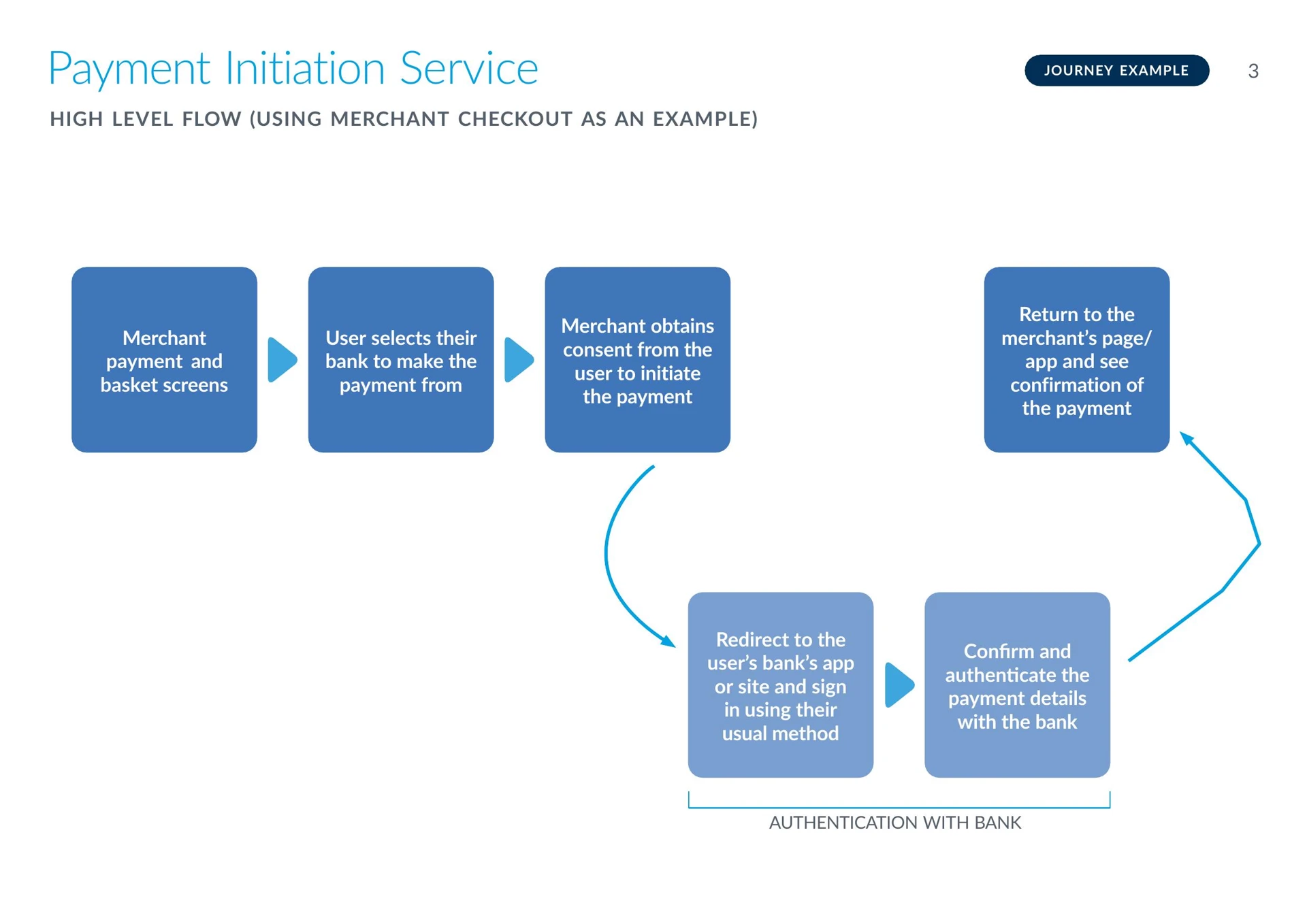
Why Open Banking matters here: The customer isn't limited to the bank account the DD was set up on. When they click the Pay by Bank link, they choose which bank to pay from. This is a key advantage for recovery — if the failure was due to insufficient funds, the customer may have money available in a different account. They see their bank options and select the one that works.
Scheme compliance — Open Banking / PIS regulatory requirements:
Pay by Bank operates under the Open Banking framework, regulated by the FCA. Your customer-facing PIS screens must comply with the following requirements:
- Explicit consent: The customer must give explicit, informed consent before any payment is initiated. The consent screen must clearly display the payee name, amount, payment reference, and the bank they are paying from.
- Redirect transparency: Before redirecting the customer to their bank, you must clearly state that they are being securely redirected and that their banking credentials will not be shared with you or any third party.
- TPP disclosure: As the payment is initiated via a regulated Third Party Provider (Modulr), your screens should include the required regulatory disclosures.
- Terms and privacy: Links to Modulr's terms and conditions and the privacy policy must be accessible from the consent screen.
TPP Disclosure
By continuing you are permitting our partner Modulr FS Limited to initiate a payment from your bank account and also agree to their terms and conditions and privacy policy.
Important: All customer-facing Pay by Bank screens and communications — including bank selection pages, consent screens, redirect pages, and confirmation screens — must be reviewed and approved by Modulr before you go live. Submit your designs early in the implementation process to avoid delays.
For full PIS setup and endpoint documentation, see Getting Started with PIS and Supported Banks.
1. Get the list of supported banks:
GET /aspspsSee the ASPSP API reference. You'll typically cache this list and present it in your payment UI.
Your customer-facing UI — bank selection
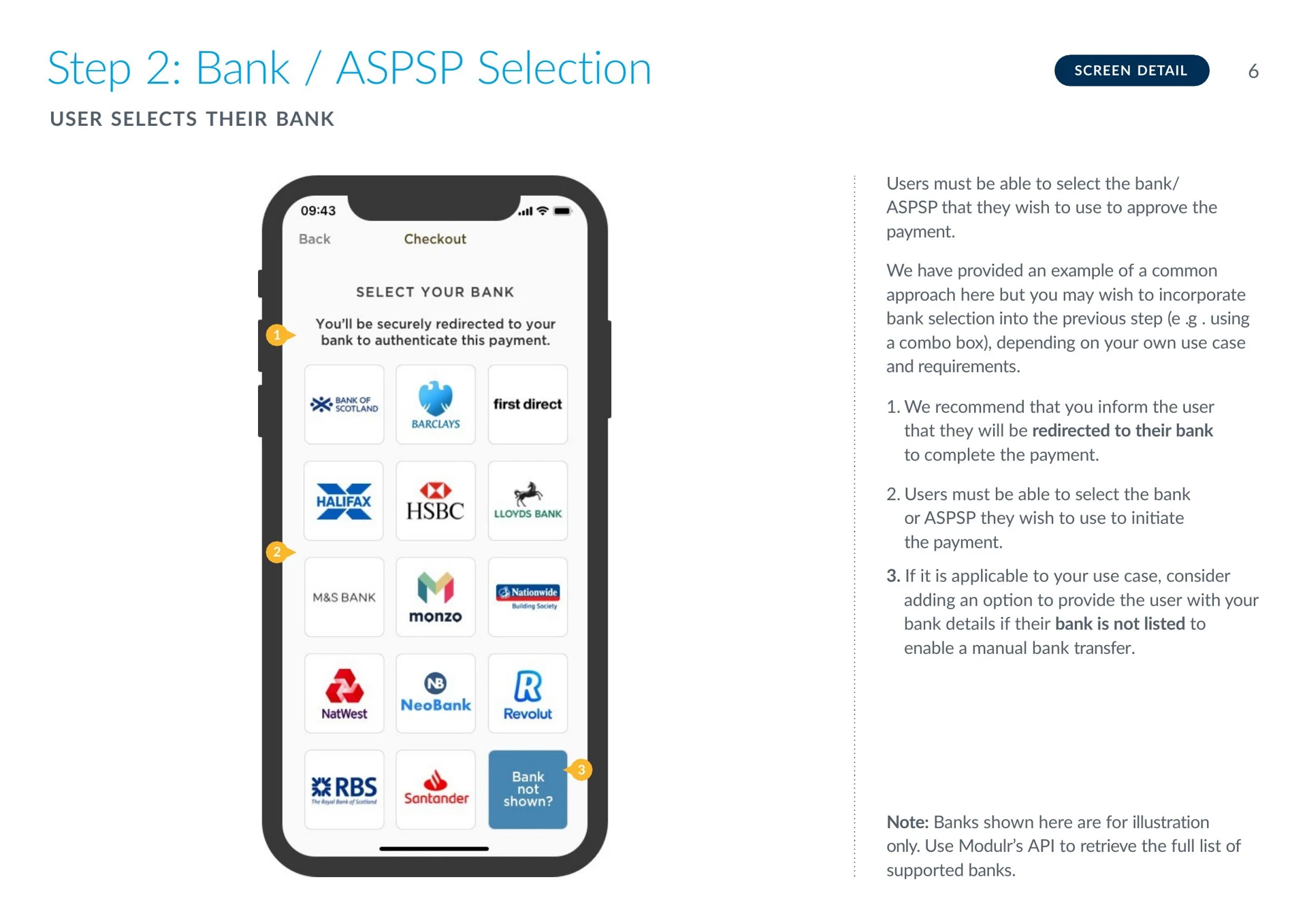
The example above shows a bank selection screen. The customer chooses which bank to pay from — they aren't limited to the DD account.
Your bank selection UI should:
- Present the full list of supported banks retrieved from
GET /aspsps, displayed with bank logos for easy recognition - Inform the customer they'll be securely redirected to their bank to complete the payment
- Include a "bank not shown?" option — consider offering your bank details for a manual transfer if the customer's bank isn't on the list
- Use Modulr's API to retrieve the bank list dynamically rather than hardcoding — the supported bank list is updated as new banks are onboarded
2. Initiate the Pay by Bank payment:
POST /pis/paymentsSee the PIS API reference.
Sample request (recovering a failed loan repayment):
{
  "aspspId": "ob-lloyds",
  "amount": 250.00,
  "currency": "GBP",
  "payee": {
    "name": "Your Business Ltd",
    "accountNumber": "12345678",
    "sortCode": "040004"
  },
  "reference": "LOAN-RPY-0142-PIS",
  "redirectUrl": "https://yourbusiness.com/payment-complete"
}
Consent and redirect screens
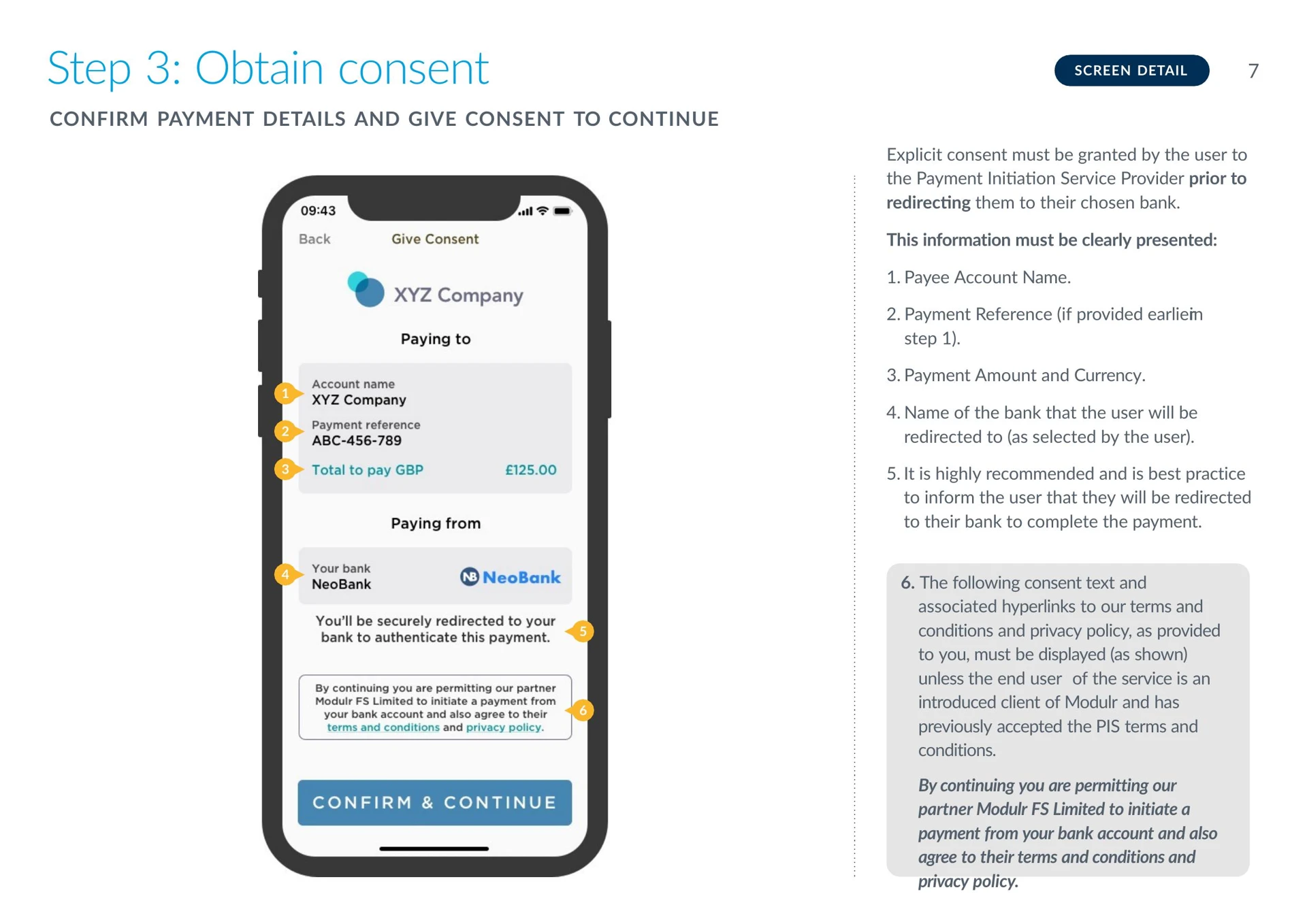
The consent screen example above shows the payment details the customer reviews before being redirected — payee name, payment reference, amount, and the selected bank. The customer must explicitly consent before the redirect.
Your consent screen must clearly display:
- Payee account name
- Payment reference
- Payment amount and currency
- The name of the bank the customer selected
- A redirect notice (e.g. "You'll be securely redirected to your bank to complete the payment")
- The Modulr consent text and links to terms and conditions / privacy policy (as provided to you during PIS onboarding)
Redirect handling: When the customer is redirected to their bank, consider showing a brief loading or redirect screen with reassuring messaging (e.g. "We're securely taking you to your bank. Your security details won't be shared with us."). Research shows this improves completion rates by giving the customer a sense of control during the handoff.
Sample response:
{
  "id": "PIS-2026-05-001",
  "status": "CREATED",
  "authorisationUrl": "https://ob-lloyds.example.com/authorise?payment=PIS-2026-05-001",
  "amount": 250.00
}
The authorisationUrl is the pay-now link. Embed it in your dunning email/SMS from Step 4. The customer clicks it → selects their bank → authenticates → payment completes.
What to know:
- Funds settle via Faster Payments — typically within seconds
- PIS is irrevocable once completed — no rejection window like DD
- The customer can choose any supported bank — they aren't locked to the DD account
- Use a distinct reference suffix (e.g.
-PIS) for reconciliation
Step 7: Monitor Recovery
What you're doing: Checking whether the recovery payment has succeeded.
For DD retry: GET /collections and the DD Collection Status webhook, same as your normal collection monitoring.
For Pay by Bank: GET /pis/payments/{paymentId} — see the PIS API reference. Subscribe to PIS status webhooks via the PIS documentation.
PIS statuses: Created → Authorised → Completed / Failed / Rejected
Confirmation screen
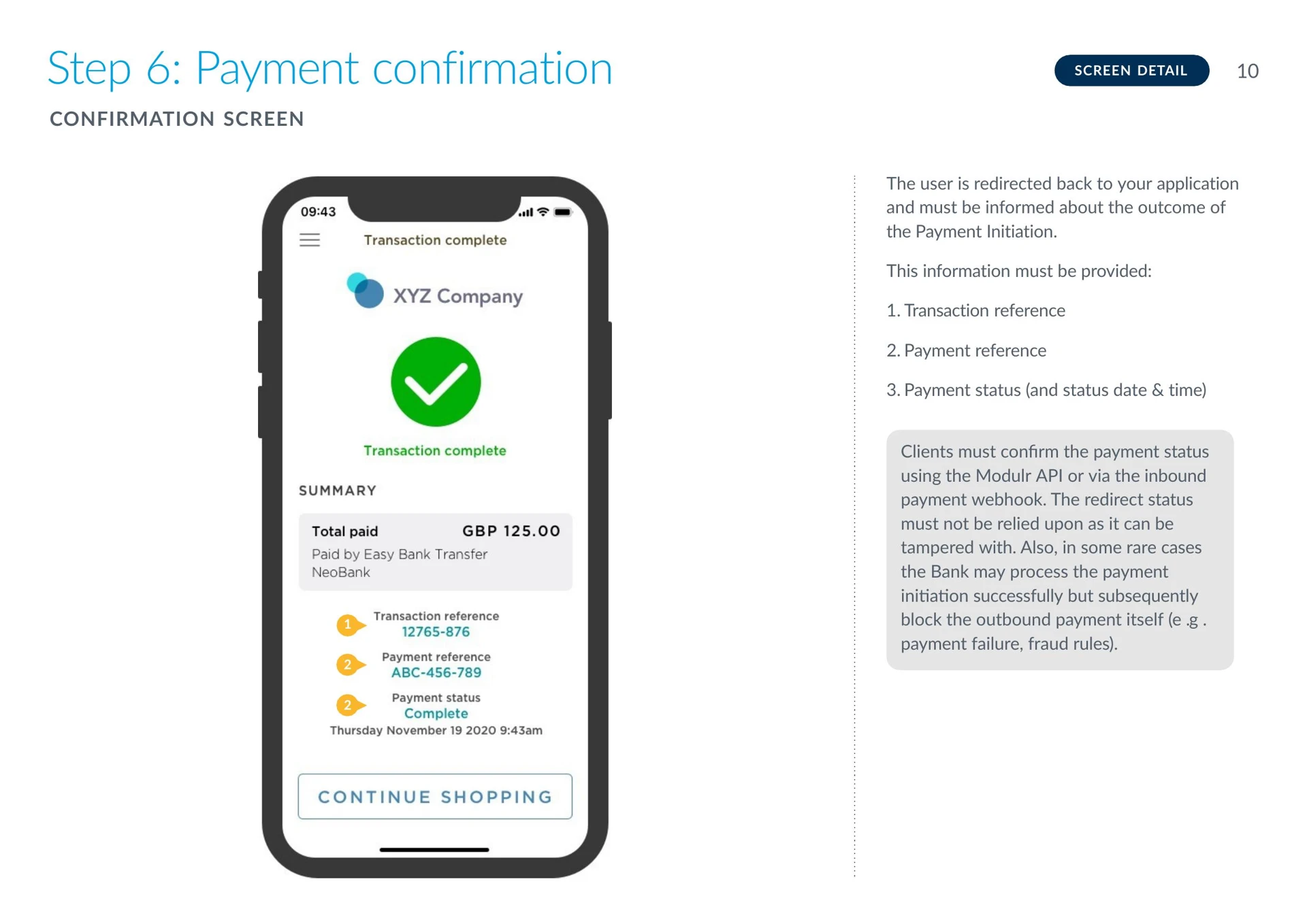
The example above shows a payment confirmation screen with the transaction reference, payment reference, and payment status. Your system should verify the payment status via the Modulr API or webhook — do not rely on the redirect status alone, as it can be tampered with.
Your confirmation screen should display the transaction reference, payment reference, payment status, and the date and time. In rare cases, a bank may process the payment initiation successfully but subsequently block the outbound payment itself — always confirm via the API.
If DD retry succeeded: Move to Step 8. Do not also send a Pay by Bank link — the payment is recovered.
If DD retry failed (or you skipped it): Send the customer a Pay by Bank link (Step 6). The customer can pay from any bank account they hold.
If PIS succeeded: Move to Step 8. Do not submit a DD retry — you'll double-collect.
If PIS also failed or the customer didn't act: Contact the customer directly. If the mandate is no longer usable, you'll need to discuss alternative payment or setting up a new mandate.
Timing: DD retry = Days 1–5 of the Bacs cycle. PIS = same day (usually minutes).
Step 8: Confirm Recovery and Resume
What you're doing: The recovery payment succeeded. Close the loop.
- Update your ledger — mark the original failed collection as recovered
- Record which rail recovered the payment — this data helps optimise your recovery strategy over time
- Resume normal collections — if the mandate is still active, the existing collection schedule continues automatically for future payments
- If the mandate was cancelled or the account closed — you'll need to set up a new mandate with the customer's updated details before DD collections can resume. In the meantime, consider using PIS or VRP for the next payment(s).
Other recovery options
The DD retry → Pay by Bank flow is the primary recovery pattern covered in this guide. Depending on your use case, other options are available:
VRP (Variable Recurring Payments): If the customer has an active VRP consent, you can initiate a recovery payment instantly without needing the customer to click a link each time. VRP can serve as both a primary collection method (replacing DD) and a recovery rail. Currently available for eligible use cases including unsecured lending, with commercial VRP expanding coverage soon. See Getting Started with VRP.
Push payment to your collection account: The customer can send a manual bank transfer to your Modulr account. This is the simplest option but relies on the customer getting the details right. You can also create dedicated named accounts per customer via POST /customers/{customerId}/accounts to simplify reconciliation — more detail on this in a future one-off payments guide.
Adjusting the collection schedule: If a customer is repeatedly failing to meet the full amount, reducing the collection amount or adjusting the frequency may be an option worth considering alongside your recovery flow.
Recovery reporting: Tracking recovery rates by failure reason code and recovery rail will help you refine your dunning timing, messaging, and approach over time.
API reference — endpoints used in this guide
| Step | Action | Endpoint | Method | API Reference |
|---|---|---|---|---|
| 1 | Check for failed collections | /collections | GET | DD Collection Status webhook |
| 1 | Webhook: collection failed | — | — | DD Collection Webhook |
| 2 | Check mandate status | /mandates/{id} | GET | Get Mandate |
| 5 | Represent unpaid collection | /collection/{collectionId}/represent | POST | Represent Collections |
| 6a | Get supported banks | /aspsps | GET | Supported ASPSPs |
| 6b | Initiate Pay by Bank | /pis/payments | POST | PIS API Reference |
| 7 | Check PIS payment status | /pis/payments/{id} | GET | Get PIS Details |
Bacs timing — recovery context
| Day | What happens | Recovery relevance |
|---|---|---|
| Day 3 | Payer's bank rejects the collection | Failure detected — notify customer, optionally retry DD or send PIS link |
| Day 5–6 | ARUDD rejection window closes | Late failures surface — funds already credited may be reversed |
If you detect a failure on Day 3 and the mandate is still active, you can choose to retry DD (adding another 3-day cycle) or send a Pay by Bank link for immediate recovery. If using PIS, the customer can pay within minutes from any bank account they hold.
← Previous: Set Up Recurring Collections ↑ Index: Collecting Payments with Modulr
Updated 3 months ago